Blur a license plate
Free forever. No sign-up, no watermark, no limits — ads keep it that way.
Open a photo, drag a box over the plate, save the covered copy — all on your own device.
Called a license plate in the United States and Canada, a number plate or registration plate in the United Kingdom, Ireland and Australia, and spelt licence plate in British English. Same rectangle, same job, same tool — whichever one brought you here.
There is no automatic plate detection here
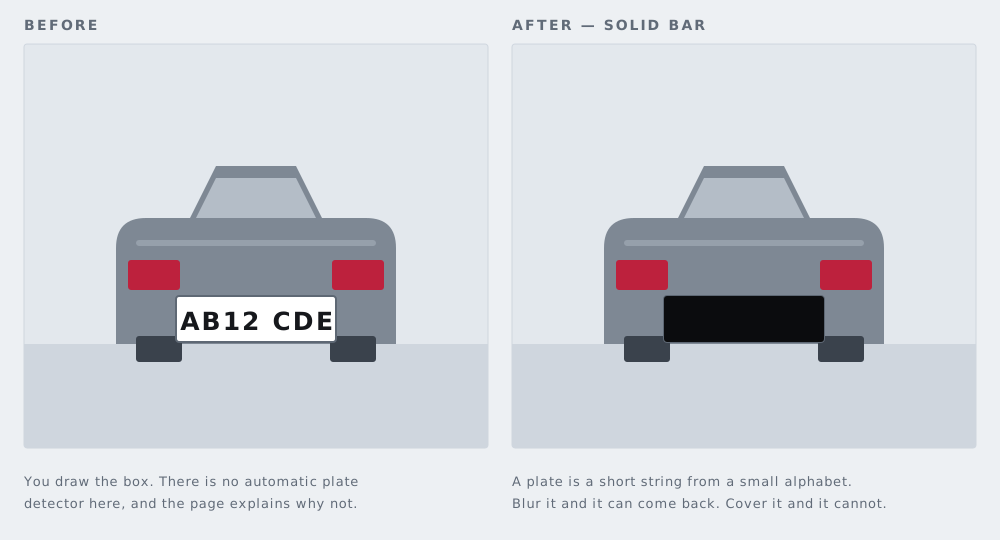
This site finds faces for you. It does not find plates for you, and that deserves an explanation rather than a quietly missing feature.
Faces are handled by the face tool, which uses Google's MediaPipe BlazeFace model. That model is published under the Apache-2.0 licence and is small enough to download to a phone once you have picked a file. Nothing equivalent exists for number plates. The plate detectors that genuinely work are either licensed for research or non-commercial use, which rules them out on a site funded by advertising, or they are large enough that pulling them over mobile data would take longer than doing the job by hand.
Variety is the deeper problem. Plate proportions, mounting height, background colour, character set and typeface differ enormously from one country to the next, and a single photograph can hold a plate at an angle, in shadow, or half hidden behind a tow bar. A detector that finds three plates out of five is worse than no detector at all: it teaches you to trust it, then misses the fourth one on the day it matters.
So this page asks you for a box. Drag it over the plate, then drag another over any second plate in the frame. It takes about four seconds and it is correct every time, which is more than an unreliable model can offer. The same hand-drawn box is how the black out text tool works, for the same reason.
Why a solid bar, not a blur
The default here is a solid black bar, and on a license plate that is not a matter of taste. It is the only mode that actually removes the information.
Consider what a plate is. It is a short string of characters, drawn from a small and highly structured alphabet, set in a known typeface at known spacing inside a rectangle of known proportions. Almost everything about it is fixed before the shutter opens. The only unknown is which characters.
Blur and pixelation do not delete pixels. They average them. A blurred plate still carries the shadow of every dark stroke against its pale background: where the ink was heavy, the average stays dark. That residue is useless when the thing underneath could have been anything at all. It is extremely useful when the thing underneath could only have been one of a limited set of characters, because then nobody has to read the plate. They only have to rank guesses. Render a candidate string in the right font, blur it the same way, compare it against the picture, repeat. The closest match is the answer, and the work is arithmetic rather than insight.
That is the difference between a plate and a face. A face is a large, irregular subject with no finite alphabet behind it, so averaging its pixels throws a great deal away — though not always as much as people assume, which is the subject of whether AI can unblur a face. A plate is the opposite: small, structured, and drawn from a short list. Structure is precisely what survives averaging.
A solid bar replaces the pixels with a flat colour and cannot be undone. Pixelation and blur average the pixels, and averaged pixels can sometimes be partly recovered. If you want the three modes set out side by side, blur, pixelate or black box compares them. For a plate, take the bar. Save pixelation for cases where you want a viewer to see that something was covered and the exact content does not matter.
Where plates hide in a photo you did not think about
The plate you meant to cover is the easy one. These are the ones people miss.
- Your own plate reflected in the paintwork, usually in a door or across the bonnet on a bright day.
- A plate in a wing mirror — small, sharp, and sitting in the middle of the frame in any three-quarter shot.
- The neighbour's car at the kerb behind you. It is not your plate, but it is somebody's, and it places your car on a particular street.
- A reflection in a shop window or a glass door behind the car, which can show the plate of a vehicle that is not even in the shot.
- The small plate on a trailer, a caravan or a bike rack, easy to overlook because it is not where a plate normally sits.
One practical point on top of that: across a set of photos you almost always publish both the front and the rear plate, because you photograph the car from both ends. Covering one covers nothing. Work through every image in the set, not only the one you thought was the risky one.
The rest of the car photo
The plate is the obvious identifier and rarely the only one. A VIN plate at the base of the windscreen, a service book, a registration document photographed to prove the mileage, an insurance certificate, a delivery label on a box in the boot — all of that is text, and text is covered with the black out text tool. Faces caught in the background of a driveway shot belong to the face tool. The file itself may also carry the GPS coordinates of the spot where you took the picture, which the metadata stripper will show you. Saving a photo from this page re-encodes it, and that drops the EXIF block along the way.
For the full sequence — which photos to take, what to cover in each, and what to leave in so the advert still looks honest — read selling your car online.
What this tool does
- Where it runs
- Entirely in this browser tab. No image is uploaded, because there is no server to upload it to.
- Modes
- Solid bar (the default, irreversible), pixelate, blur.
- Accepts
- JPG, PNG, WebP, GIF, BMP, AVIF, SVG, HEIC/HEIF and TIFF. Camera RAW is refused.
- Exports
- PNG at the resolution of the file you opened, or JPG. No watermark, no cap on how many photos you do.
- Metadata
- Re-encoding through the canvas strips EXIF, including GPS coordinates.
- Not supported
- Video. Still images only.
Common questions
Why are camera RAW files refused?
CR2, CR3, NEF, ARW, DNG, ORF and RAF are sensor data rather than finished pictures, and browsers cannot decode them reliably — the same file can open in one browser and fail in the next. Rather than hand you a mangled image, the tool declines the file and says why. Export a JPG or a PNG from your photo software and open that instead.
Can I cover more than one plate in the same photo?
Yes. Draw as many boxes as the picture needs, move or resize any of them, and delete one you no longer want. Each box carries its own mode, so a plate can take a solid bar while a face in the same frame is pixelated.
Does the saved file lose resolution?
The working image you draw on is capped at 3,000 pixels on its long edge so a large photo does not exhaust the memory on a phone. The file you download is composed against the full-resolution original at its original pixel dimensions. PNG is lossless; JPG re-compresses, as JPG always does.
Is a black bar enough on its own?
For the pixels, yes. They are replaced, and nothing in the saved file can bring them back. What a bar cannot cover is context: a distinctive wheel, a dealer sticker, a house number, or the same car photographed in front of the same gate in another advert. A black rectangle is not redaction sets out where that reasoning fails in documents.
Do I need an account, and will this stay free?
No account, no email address, no sign-up and no daily cap. Advertising pays the hosting bill. There is no Pro tier and none is planned.
The other six tools
Same editor underneath, same promise: the file is opened by your browser and never uploaded. Pick whichever matches the thing in front of you.
-
Blur faces in a photo
The only one here with automatic detection. Group shots, a school play, strangers in the background of a street scene.
Automatic · bar, pixelate or blur
-
Pixelate part of a photo
Starts in pixelate mode, for when the shape of a thing should stay readable but the detail of it should not.
Pixelate · adjustable block size
-
Black out text in an image
An address on an envelope, a name on a form, a booking reference. Solid bars, with nothing left underneath them.
Solid bar · nothing recoverable
-
Blur a screenshot
An email address, a chat name, a bank balance — covered before the grab goes into a thread or a support ticket.
Screens · PNG in, PNG out
-
Redact a PDF
A document rather than a picture. Every page is flattened, which is the only way a black box over PDF text is worth anything.
Up to 120 pages · no text layer left
-
Strip photo metadata
No bars at all. It reads what your file is carrying, GPS coordinates included, and writes you a clean copy of it.
EXIF · GPS · camera serial