Pixelate part of a photo
Free forever. No sign-up, no watermark, no limits — ads keep it that way.
Drop a photo in, drag a box over what should go, and download it. This page starts in pixelate mode.
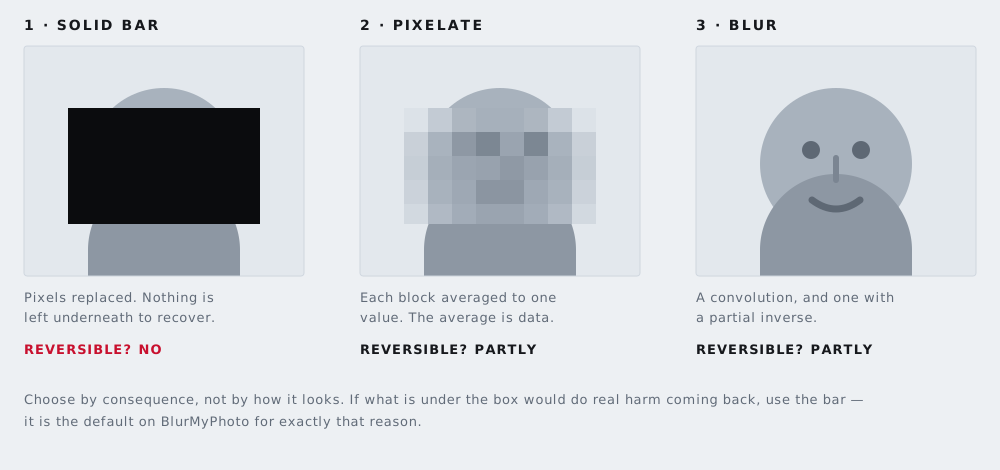
What pixelation actually does
The area you select is divided into a grid. Every cell is replaced by the average colour of the pixels that were inside it, and the grid is then scaled back up to fill the original space. That is the whole operation, and its consequence is the thing worth understanding: the average is real information about what used to be there. Pixelation does not delete the content so much as summarise it very coarsely.
This is why pixelation is weaker than it looks. A face reduced to forty blocks still carries skin tone, hair colour, the position of shadows, the shape of the hairline, and the outline of the head. Someone comparing it against a handful of candidate photographs does not need to reverse anything — they only need to notice which candidate produces a similar pattern of averages.
Larger blocks retain less. That is the only dial that matters, and most people set it far too fine.
When pixelation is the right choice
There are real cases where it beats a solid bar, and they are mostly about how the image reads rather than how well it protects.
- When the viewer should understand that something was deliberately removed. A pixelated region announces an editorial decision. A black rectangle can read as a printing fault.
- When a black block would wreck the picture. In a set of otherwise clean photographs — a listing, a portfolio, a report — a mosaic patch is visually quieter than a hard rectangle.
- For background elements that are not themselves sensitive. A stranger in the far distance, a logo you would rather not advertise, a number plate three streets away.
- Where the convention is established. Documentary and news photography have used pixelation for decades and audiences read it correctly.
When it is the wrong choice
Do not pixelate anything whose content comes from a small set of possible values. That covers more than people expect:
- Text of any kind — a name, an address, an email, a reference number
- License plates, which are short strings from a known alphabet in a known layout
- Account numbers, sort codes, card numbers, postcodes
- Screens showing a message, a balance, or a notification
- Signatures, barcodes and QR codes
For all of those, the attacker does not have to reconstruct anything. They generate the candidates, pixelate each one the same way, and compare. If you are covering text, use the black-out tool; for a vehicle, use the license plate tool. Both default to a solid bar for exactly this reason.
Pixelate or blur?
They fail in similar ways and for the same underlying reason — both attenuate information rather than destroying it — but they fail differently. Blur spreads each pixel's value across its neighbours, so a small radius leaves a great deal intact and the result often looks more finished than it is. Pixelation is at least honest about how much it has thrown away: you can see the block size, and so can everyone else.
If the goal is protection rather than appearance, neither is the right answer. There is a full comparison in blur, pixelate, or black box, and a look at what modern software can and cannot recover in can AI un-blur a blurred face?
How to use this page
- Drop a photo in, or choose one. It is read by your browser and is not uploaded.
- Faces are found automatically. Delete any box you do not want, and drag new boxes over anything else.
- Pixelate is already selected here. Switch any region to a solid bar or a blur if it suits it better.
- Download. You get the same pixel dimensions you started with, with no watermark.
Every format your phone or camera is likely to produce is accepted, including iPhone HEIC files. Camera RAW is the one exception and the tool says so plainly rather than failing quietly.
Questions
Can pixelation be reversed?
Sometimes, partly. Each block holds the average colour of the pixels it replaced, and that average is real information about what was there. Researchers have shown that pixelated faces and text can be matched back to originals when the attacker has a limited set of candidates to compare against. A solid bar has no such weakness, because the pixels are simply gone.
How big should the blocks be?
Bigger than feels necessary. A useful rule is that the covered feature should be reduced to no more than four or five blocks across — a face pixelated into fifty blocks is still a recognisable face. If you find yourself judging block size carefully, that is a sign the content deserves a solid bar instead.
Does it work on a phone?
Yes. Draw the box with a finger, pinch to zoom in for accuracy, and the download is the same full-resolution file you would get on a desktop.
Is the pixelated area really changed in the file?
Yes. The pixels are recalculated and the image is written out fresh, so there is no hidden layer holding the original. What you see in the downloaded file is all the file contains.
The other six tools
Same editor underneath, same promise: the file is opened by your browser and never uploaded. Pick whichever matches the thing in front of you.
-
Blur faces in a photo
The only one here with automatic detection. Group shots, a school play, strangers in the background of a street scene.
Automatic · bar, pixelate or blur
-
Blur a license plate
Before a car advert goes online. Drag one box over the plate and the characters are replaced rather than smudged.
One box · irreversible
-
Black out text in an image
An address on an envelope, a name on a form, a booking reference. Solid bars, with nothing left underneath them.
Solid bar · nothing recoverable
-
Blur a screenshot
An email address, a chat name, a bank balance — covered before the grab goes into a thread or a support ticket.
Screens · PNG in, PNG out
-
Redact a PDF
A document rather than a picture. Every page is flattened, which is the only way a black box over PDF text is worth anything.
Up to 120 pages · no text layer left
-
Strip photo metadata
No bars at all. It reads what your file is carrying, GPS coordinates included, and writes you a clean copy of it.
EXIF · GPS · camera serial