What your phone photos reveal about you
PUBLISHED 11 AUGUST 2026 · 7 MIN READ
Every photo you send is two documents at once. There is the picture, and there is the file the picture travels in. Both say more than you meant to say, and only one of them can be stripped out afterwards. This is a tour of what is actually in there.
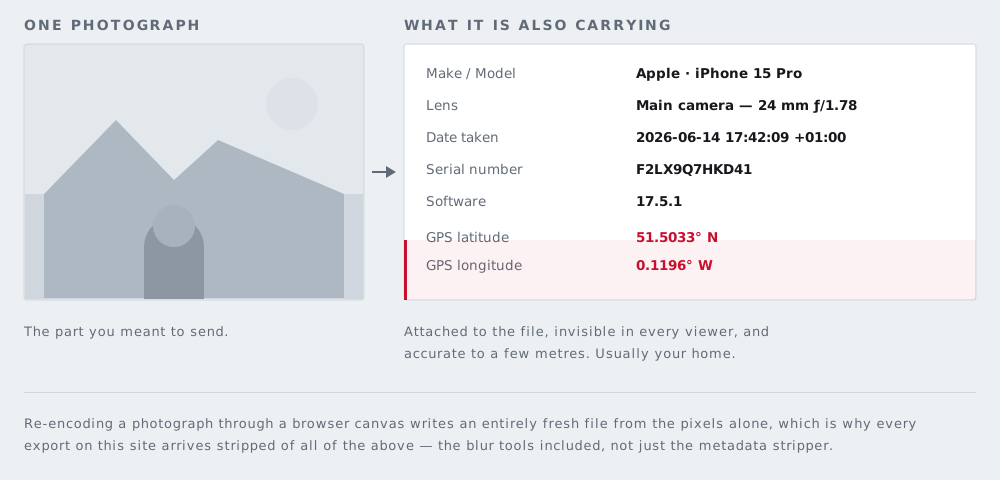
Part one: the block your camera writes
Most phone photos are JPEGs, and most JPEGs carry an EXIF block: a small structured record the camera writes next to the pixels. You cannot see it in the picture. It rides along when you email the file, send it through an app that keeps it, or attach it to a listing.
Camera, lens and exposure
The camera writes its own make and model, and often the lens: the specification has fields named LensMake, LensModel and LensSerialNumber (tags 0xA433 to 0xA435 in ExifTool's listing). Beside them sit shutter speed, aperture, ISO, focal length and whether the flash fired. One photo's worth of that is dull. Identical make, model and lens strings across twenty images posted under three names say those twenty came off one device.
The exact second, and the timezone
DateTimeOriginal (tag 0x9003) records the date and time the original image was taken, down to the second. For most of EXIF's life that timestamp carried no timezone, so 08:12:44 was ambiguous by up to a day. The 2016 revision of the standard, Exif 2.31, added OffsetTimeOriginal (tag 0x9011), which ExifTool describes plainly as the time zone for DateTimeOriginal. Current phones write it. So the file states not just the clock reading but the offset it was read in — 08:12:44 at UTC+02:00 — which pins one instant, worldwide.
Where you were standing, to within a few metres
If location tagging is on, the camera adds a GPS block: latitude (0x0002), longitude (0x0004), their hemisphere references, altitude (0x0006) with its own above-or-below-sea-level reference, and a timestamp and datestamp from the satellites. Latitude and longitude are stored as three rational numbers — degrees, minutes, seconds — so the format has more precision available than the fix behind it ever uses.
What limits the number is the phone. The United States government's GPS.gov states that GPS-enabled smartphones are typically accurate to within a 4.9 m (16 ft.) radius under open sky, worsening near buildings, bridges and trees. Five metres is a room. It is not a neighbourhood or a postcode. It is the back bedroom rather than the front one.
On 3 December 2012, The Next Web reported that a photograph Vice had just published of John McAfee, then a fugitive, still had its metadata intact, and that readers used it to pinpoint a location in Guatemala.
Serial numbers and software
Some cameras write the serial number of the body itself, in a field the specification calls BodySerialNumber (tag 0xA431). Where it is filled in, it identifies one physical camera rather than a model. Phones generally leave it empty; interchangeable-lens cameras frequently do not. Manufacturers also keep a proprietary MakerNotes block inside EXIF whose contents vary by brand. Separately, the Software field (tag 0x0131) names whatever last wrote the file, usually the editor rather than the camera.
The thumbnail that outlived the crop
A JPEG can carry a small preview of itself inside the file. ExifTool documents it as living in IFD1, addressed by ThumbnailOffset and ThumbnailLength. If an editor rewrites the main image but does not regenerate that preview, the preview is still the old picture.
The best-known case is from June 2003. The television presenter Catherine Schwartz posted tightly cropped photographs of herself on her blog; as the account on her Wikipedia entry records, the hidden EXIF thumbnails in at least two of them still showed the uncropped originals, because the version of Photoshop she had used did not create replacement thumbnails. Editors have largely fixed this since. "Largely" is doing real work there, and it is one reason to strip a photo's metadata in your browser rather than trust that a crop removed anything — a point developed in why a black rectangle is not always redaction.
Part two: what the picture gives away
Metadata can be removed. The picture cannot. Everything below survives every stripper, every re-encode and every platform that scrubs EXIF, because it is made of the pixels you chose to publish.
Reflections
Windows, mirrors, glasses, kettles, oven doors, car paint, a switched-off television — and eyes. In 2013, Rob Jenkins of the University of York and Christie Kerr of the University of Glasgow published Identifiable Images of Bystanders Extracted from Corneal Reflections in PLOS ONE, recovering the faces of unseen bystanders from reflections in the eyes of photographed subjects. Shot on a 39-megapixel camera, those recovered faces measured 27 to 36 pixels across. Observers who did not know them still matched them correctly 71 per cent of the time; observers who did reached 84 per cent.
The real-world version needs no laboratory camera. In October 2019, Japanese police arrested Hibiki Sato over an assault on a pop singer. CBS News reported that police said he had studied the scenery reflected in her eyes in her own selfies, triangulated those landmarks through Google Street View to identify her station, then used curtain placement and the direction of light in videos shot inside her flat to work out which building she lived in.
Addresses, uniforms and logos
House numbers on doors and on wheelie bins. Street name plates. The plaque on a block of flats. A distinctive roofline, a church spire, a stretch of skyline — any one is a search term, and a skyline plus a compass direction is a position. This is the standard failure in property photography, which is why we wrote a guide on what to cover in estate agent listing photos.
Then the clothing. A school jumper crest, a nursery logo on a book bag, a workplace lanyard, a hospital wristband. A crest names a school, a school names a catchment area, and a catchment area narrows an address to a few streets — for a child rather than for you.
Paper on the table
Delivery labels on the box in the hallway. Bank envelopes. A letter face up next to the mug. Prescription labels. A boarding pass with a name and a booking reference printed on it. Text is the one thing a blur handles badly, because short strings in a known format are easy to guess back — use a solid bar and black out the text on a label or a letter instead.
Keys
A clear photograph of a key is, functionally, a copy of the key. In 2008, Benjamin Laxton, Kai Wang and Stefan Savage of the University of California, San Diego presented Sneakey at the ACM Conference on Computer and Communications Security: software that reads a key's bitting code — the pattern of cut depths — straight out of a photograph. Their demonstrations included keys on a café table, shot with a telephoto lens from a rooftop roughly 60 metres away.
Router labels, screens and notifications
The sticker on the back of a home router usually prints the network name and the default Wi-Fi password, and plenty of people never change it. A laptop open in the background can show an email subject line, a file path, a client name, a balance. A phone on the arm of the sofa shows notifications. Screenshots leak the same way, which is what the screenshot blurring tool is for.
Vehicles
A registration plate on the driveway ties a photo to a vehicle, and often to a household. Read our tool honestly here: BlurMyPhotos detects faces automatically and nothing else. There is no automatic plate detection. On the license plate page you draw a box over the plate yourself, then choose a solid bar, a blur or a pixelation.
Which platforms strip metadata
It depends on the platform, on whether you used the app or the website, on the file type, and on the year. Platforms change this behaviour without announcing it, so a table of names would be out of date before it was useful.
What can be checked is documentation. Google publishes its own: the Google Photos location data page states that new albums, links, conversations and other shared items do not include location details by default, that you can choose to include them, and that locations Google itself estimated are not shared even when you do. Apple's Personal Safety User Guide documents removing location from a single photo on an iPhone — open the photo, tap the More button, tap Adjust Location, then No Location — and stopping it being recorded at all under Settings, Privacy & Security, Location Services, Camera, Never.
For anything undocumented, test rather than guess. Send the photo to yourself by the exact route you plan to use, download the received copy back — the copy the other person would get, not the original in your camera roll — and read that file's metadata. Our metadata tool lists what a file contains before it removes anything, so it works as a checker as well as a stripper. There is a step-by-step version in how to check a photo's metadata before you send it.
Two things to keep straight. A platform stripping EXIF from the public copy does not mean the platform never received the original: it protects you from other users, not from the service. And stripping does nothing at all to the picture — the reflections, the house number and the router label are still there.
An exercise before you post
Open the photo full screen, zoom to actual pixels, and pan across it in a grid rather than glancing at it whole. Your eye skips background detail when the picture is small, which is the entire problem. Then ask four questions in order.
- What is written? Labels, signs, screens, paper, plates, badges, house numbers.
- What is reflective? Glass, mirrors, paintwork, screens, glasses, eyes.
- Who is in it? Anyone who did not agree to be posted, especially other people's children.
- What is a number? Plates, door numbers, account numbers, reference numbers, dates.
Then fix what you found. Blurring the faces is the one part we automate: the detector runs in your browser, finds the faces, and you adjust or add boxes by hand where it misses one. Everything else — plates, labels, screens, keys — is a box you draw. Strip the metadata last, after the edit, so nothing an editor wrote on the way through survives. No image you open on this site is uploaded anywhere; the file is decoded, edited and saved by your own browser, which is the only arrangement under which a page about what photos reveal is worth taking seriously.