Strip GPS and camera data from a photo
Free forever. No sign-up, no watermark, no limits — ads keep it that way.
See what the file is carrying, then download a copy without it.
What is written inside a photo
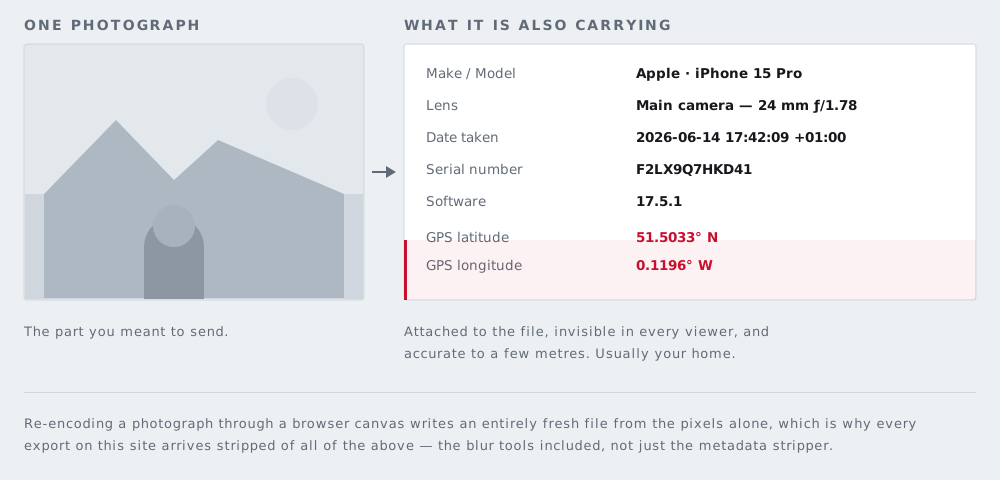
Alongside the picture, most cameras and phones store a block of structured information called EXIF. The fields that matter to most people are these:
- GPS latitude, longitude and altitude — where the shutter was pressed
- Date and time, usually with the timezone offset, which places you as well as times you
- Camera make and model, and on many cameras a body serial number
- Lens and exposure settings — mostly harmless, occasionally identifying
- Software that last wrote the file, and sometimes an edit history
- An embedded thumbnail — a small second copy of the image stored inside the file
JPEG files may also carry XMP and IPTC blocks, which hold captions, keywords, credit lines, and author details, and an ICC colour profile. PNG files carry their own text chunks. This page reports all of them when it can read them.
The precision is the point
People assume a geotag is approximate. It is not. Coordinates are stored as degrees, minutes and seconds with fractional precision, which locates a photograph to within a few metres. That is a building, and frequently a particular room in it.
A handful of photographs taken at home, posted over a few months, describe an address, a routine, and an absence pattern — when the house is empty and for how long.
Stripping metadata does not change anything you can see. If the picture shows your street sign, your house number, a delivery label, your child's school jumper, or a screen with your name on it, removing the GPS field achieves nothing. The information is in the image. A file with no metadata whatsoever can still identify exactly where you live.
So most photos need two jobs done
Redaction handles what is visible; metadata stripping handles what is written. They are separate operations and neither substitutes for the other. Cover the visible things first — faces, addresses and documents, license plates — and then clean the file. Note that anything you download from those tools has already had its metadata discarded, because rebuilding an image through a canvas drops the EXIF block as a side effect. This page exists for the photo that needs nothing covered, only cleaned.
Which platforms strip it for you
Some social networks and messaging apps remove EXIF when you upload; some keep parts of it; some strip it from the displayed image but retain the original. The behaviour varies by platform, by whether you send a photo as a file or as an image, and it changes without announcement.
Rather than trusting a list that will be out of date, check for yourself: upload an image somewhere, download the version that platform serves back, and inspect that file. The step-by-step instructions for inspecting a file on each operating system are in how to check what metadata a photo carries.
The objection to online EXIF tools
Almost every metadata checker on the web asks you to upload the photograph first. Think about what that means. You suspect the file contains your home address, and to confirm it you send the file — and the address — to a server you know nothing about. The check is the disclosure.
This page reads the bytes on your own machine. The evidence for that claim, and how to verify it yourself with your browser's network inspector or by switching to aeroplane mode (airplane mode), is on how it works.
What you lose
Stripping is indiscriminate, and it is worth being clear about the cost. The capture date goes, which you may want for your own records. Creator and copyright fields go, which matters if you are a photographer relying on them. The colour profile goes, which can slightly shift how the image renders on a wide-gamut display.
Your original file is untouched, so the sensible habit is to keep it and publish the clean copy.
Questions
Is my photo uploaded to read its metadata?
No. The file is read byte by byte by your own browser. There is no server to upload it to — that is the difference between this and the online EXIF viewers that ask you to hand over the file first.
Does this change the picture at all?
The image is re-encoded, so a JPEG is compressed again and may differ from the original by an imperceptible amount. The pixel dimensions are unchanged and nothing is cropped, scaled, or watermarked.
Will it remove the copyright information too?
Yes. Stripping is all or nothing here: creator, copyright, and caption fields go along with the GPS and the camera details. If you rely on embedded credit, keep the original and publish the clean copy.
Why can it not read my iPhone HEIC file?
HEIC stores its metadata in a container this page does not parse. The clean copy is still built from the decoded pixels, so it carries nothing regardless — you simply will not see a list of what was there.
Is my original file changed?
No. Nothing on your device is modified. You get a new file alongside the original.
The other six tools
Same editor underneath, same promise: the file is opened by your browser and never uploaded. Pick whichever matches the thing in front of you.
-
Blur faces in a photo
The only one here with automatic detection. Group shots, a school play, strangers in the background of a street scene.
Automatic · bar, pixelate or blur
-
Blur a license plate
Before a car advert goes online. Drag one box over the plate and the characters are replaced rather than smudged.
One box · irreversible
-
Pixelate part of a photo
Starts in pixelate mode, for when the shape of a thing should stay readable but the detail of it should not.
Pixelate · adjustable block size
-
Black out text in an image
An address on an envelope, a name on a form, a booking reference. Solid bars, with nothing left underneath them.
Solid bar · nothing recoverable
-
Blur a screenshot
An email address, a chat name, a bank balance — covered before the grab goes into a thread or a support ticket.
Screens · PNG in, PNG out
-
Redact a PDF
A document rather than a picture. Every page is flattened, which is the only way a black box over PDF text is worth anything.
Up to 120 pages · no text layer left