Black out text in an image
Free forever. No sign-up, no watermark, no limits — ads keep it that way.
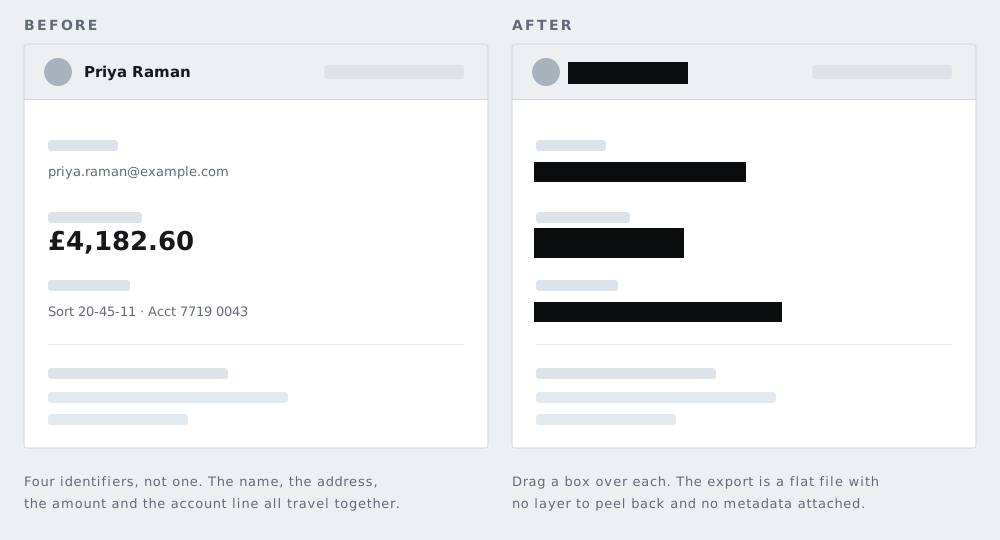
Drag a box over anything written and it is replaced with solid black. The pixels are gone, not hidden.
Text is the easiest thing in the world to recover from a blur
This is the point the whole page turns on, so it is worth stating carefully.
An arbitrary photograph is hard to reconstruct because almost any arrangement of pixels is possible. Text is not like that. It is drawn from a small alphabet, in a known font, at a known size, along a straight baseline, following the rules of a known language or a known format. A UK postcode has a shape. A sort code is six digits in three pairs. An email address ends in one of a few thousand common domains.
That turns recovery into a matching exercise. An attacker does not need to invert the blur. They render every candidate string, apply the same blur at the same radius, and compare the results against what you published. With a constrained format — an account number, a postcode, a reference — the candidate list is small enough that this is quick, and it does not require anything more exotic than a script.
Pixelation fails the same way and for the same reason. Each block reports the average ink coverage of the characters beneath it, which is a strong signal about which characters they were.
A solid fill has no such weakness. There is no residue to compare against, because the original values are not in the file in any form.
The document-redaction trap, which is worse
If your sensitive text is in a PDF, a Word file, or a slide deck rather than a photograph, covering it with a black rectangle does not remove it at all. The characters remain in the file as text objects with the rectangle painted on top, and anyone can select, copy, and search them. This has exposed real information in real court filings and government reports.
Covering text in an image is a fundamentally different operation: the pixels themselves are replaced, and there is no layer underneath because an image has no layers once it is written. That is why converting a sensitive document to an image and redacting that is a reasonable fallback when you do not have proper redaction software — and it is exactly what the PDF tool on this site does for you, page by page. The full story, with documented cases, is in why a black rectangle in a PDF is not redaction.
What people actually need to cover
Working from what tends to appear in photographs people are about to publish:
- Postal addresses — on letters, parcels, delivery labels, and returns slips
- Email addresses and phone numbers, including on business cards and van livery
- Bank details: account numbers, sort codes, IBANs, and card numbers including the expiry
- National insurance, social security, and tax reference numbers
- Passport, driving licence, and identity card numbers
- Vehicle identification numbers, on the windscreen plate and in documents
- Order numbers, tracking numbers, and booking references, which are often enough to query a system
- Signatures — reproducible, and awkward to prove misuse of afterwards
- QR codes and barcodes
- Names on badges, lanyards, coat pegs, doors, and rotas
QR codes and barcodes deserve their own warning
Both formats are designed to survive damage. QR codes include error correction that can reconstruct the payload when a substantial fraction of the code is unreadable, which is why a scanner still reads a code with a logo in the middle or a torn corner. Obscuring part of one is therefore not a partial protection — it may be no protection.
Cover the entire code, including its quiet border. The same applies to the barcode on a parcel label, which typically encodes a tracking number that can be looked up.
Covering text on a busy background
A solid bar over text sitting on a photograph can look abrupt, and the instinct is to reach for a blur so it blends in. Resist it — that instinct is exactly how readable text ends up published. Draw the box slightly larger than the text block, keep it aligned to the text rather than the background, and accept the rectangle. On a phone, pinch to zoom before drawing so the box lands tightly.
How to use this page
- Drop in the photo or screenshot. It is read by your browser and never uploaded.
- Any faces are found automatically; delete boxes you do not need.
- Drag a box over each piece of text. Solid black is already selected.
- Download at full resolution, with no watermark and no metadata carried over.
If you are working from a phone screenshot, the screenshot page lists the things that hide in a screen capture — notification banners, account handles, open tabs — which are easy to miss. If the file also needs its location data removed, use the metadata tool.
Questions
Why not just blur the text?
Because text is drawn from a small alphabet in a predictable layout, which makes blurred text a matching problem rather than an image problem. Someone can render every plausible string, blur each the same way, and compare. A solid bar removes the pixels, so there is nothing to match against.
Does this remove text from a PDF?
Not this page — this one works on images. Use the PDF tool instead, which flattens each page to a picture so the characters are genuinely gone. Drawing a black box over text in a PDF editor leaves the characters in the file, which is a separate and much more dangerous problem: there is a full explanation in why a black rectangle is not redaction.
What about a QR code or a barcode?
Cover the whole thing. Both formats include error correction, so a partly obscured code can often still be read by a scanner. Leaving a corner visible is not a margin of safety.
Can I cover text on a busy background?
Yes. Draw the box a little larger than the text itself and use a solid bar. Pinch to zoom first if you are on a phone and the text is small.
Will the downloaded file still have my camera data in it?
No. The image is rebuilt and written out fresh, which discards the EXIF block — camera model, timestamp and GPS position all go with it.
The other six tools
Same editor underneath, same promise: the file is opened by your browser and never uploaded. Pick whichever matches the thing in front of you.
-
Blur faces in a photo
The only one here with automatic detection. Group shots, a school play, strangers in the background of a street scene.
Automatic · bar, pixelate or blur
-
Blur a license plate
Before a car advert goes online. Drag one box over the plate and the characters are replaced rather than smudged.
One box · irreversible
-
Pixelate part of a photo
Starts in pixelate mode, for when the shape of a thing should stay readable but the detail of it should not.
Pixelate · adjustable block size
-
Blur a screenshot
An email address, a chat name, a bank balance — covered before the grab goes into a thread or a support ticket.
Screens · PNG in, PNG out
-
Redact a PDF
A document rather than a picture. Every page is flattened, which is the only way a black box over PDF text is worth anything.
Up to 120 pages · no text layer left
-
Strip photo metadata
No bars at all. It reads what your file is carrying, GPS coordinates included, and writes you a clean copy of it.
EXIF · GPS · camera serial