How BlurMyPhotos works
What happens to a photo you open here, in order; where the face model comes from; and what "runs in your browser" actually buys you. The section on checking it yourself matters most — you should not have to take our word for any of this.
What happens when you open a photo
- You choose a file, or drop it on the page. The browser hands the page a
Fileobject. Nothing goes to the network. - It is decoded to pixels. The browser handles JPG, PNG, WebP, GIF, BMP, AVIF and SVG itself; HEIC, HEIF and TIFF need a small decoder, fetched only when such a file is opened.
- The pixels go into a canvas in the page. The working copy caps at 3,000 pixels on the long edge to spare phone memory; the full-resolution original stays beside it.
- If you ask for faces, the detector downloads and runs — the only fetch beyond the page itself, and never before you pick a file.
- You add, move and delete boxes. Each is four numbers in image pixel coordinates plus a mode. On export they are painted onto a canvas built from the full-resolution original, which the browser encodes to PNG or JPG.
Where the face detection comes from
Detection uses Google's MediaPipe Tasks Vision 1.0.1, Apache 2.0 licensed, from the jsDelivr CDN, with the blaze_face_short_range model in float16 from Google's MediaPipe model storage. Google's documentation for the Face Detector describes the architecture as BlazeFace and this variant as the one optimised for front-facing phone camera images at short range.
Both arrive only after you choose a file, never at page load, and run on your own processor. What returns is rectangles with a confidence score — a detector finds where a face is, not whose. Adjust them on the face blurring tool, or draw your own instead.
There is no automatic plate detection, and no pretend one: no reliable, permissively licensed plate model runs in a browser, so covering a license plate means dragging one rectangle over it.
What "in your browser" actually means
Many tools promise to delete your file an hour after upload. That promise requires the upload. From then on you trust a retention policy, a backup schedule, logs, access control, and whatever follows a breach or a court order.
This site takes a different position instead. It is plain HTML, CSS and ES modules on Cloudflare Pages: no build step, no server-side code, no database, no accounts. There is no upload endpoint, because nothing is running that could receive one.
The browser then enforces it. The Content-Security-Policy header this site sends names a short fixed list of origins in its connect-src directive and refuses everything else: the site itself, cdn.jsdelivr.net (the face-detection runtime, the HEIC and TIFF decoders, and the pdf.js renderer used by the PDF tool), storage.googleapis.com (Google's model file, fetched read-only), cloudflareinsights.com (a cookieless page-view beacon that carries a URL and a timing figure and has no access to a canvas), and Google's advertising endpoints, which request advertisements and can reach nothing else on the page. MDN's reference for that directive sets out what it governs — fetch, XMLHttpRequest, WebSocket, EventSource and sendBeacon — and any origin not on the list is blocked outright. A script that wanted to leak your photo would have nowhere to send it.
Read that list adversarially, because that is how it was chosen. Not one of the four is an endpoint this site could POST an image to. Two of them are read-only CDNs that hand files down and take nothing back. The beacon is the only one that transmits at all, and what it transmits is the address of a page you already asked for. When advertising is switched on, Google's ad endpoints will join the list and this paragraph will be rewritten the same day — but the test it has to pass will not change: no origin on this site's allow-list is one a photograph could reach.
How to check this yourself
- Watch the network. Developer tools, Network tab, reload before touching a file: HTML, one stylesheet, fonts, the page's own modules. Then open a photo and work. Filter by the POST method and the list stays empty. The detector's requests are GETs, and a GET carries no image.
- Pull the plug. Run the detector once so its files are cached, then switch to aeroplane mode (airplane mode, if your phone calls it that). Open a photo, detect, adjust, export. It all still works. A tool that uploaded would stop dead here.
- Read the header. Run
curl -I https://blurmyphotos.com/, or read the document's response headers in the Network tab, and check theconnect-srclist for yourself. - Read the code. No build step and no minifier, so
/assets/shell.js,/assets/app.js,/assets/regions.js,/assets/detector.jsand/assets/ads.jsare the files as written, comments included. The last of those is the entire advertising surface of the site, in one file you can read in five minutes.
What the three modes do to the pixels
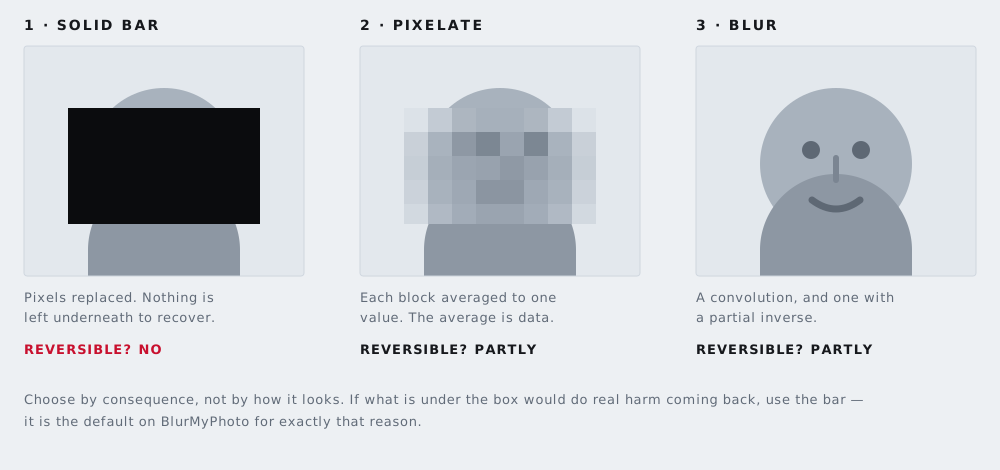
A solid fill paints the rectangle flat: the original values are not in the exported file in any form, so there is nothing to recover. That is why it is the default. Pixelation averages each block down to one value and scales it back with smoothing off, and those averages are real information about what was underneath. Blur — three stacked box-blur passes — is a mathematical operation with a partial inverse, which is why deconvolution exists.
Blur and pixelation can sometimes be partly reversed. A solid bar cannot. If what sits under the box would cause harm if it came back, use the bar. More on the trade-off in blur, pixelate or black box.
What happens to the metadata
A canvas holds a bitmap and nothing else: no camera model, no timestamps, no GPS. Because every file here is encoded out of a canvas, the EXIF block is discarded as a side effect of exporting — platform behaviour, not something bolted on, which is why it is dependable. If stripping metadata is the whole job, the metadata stripper does that alone. Your original on disk is never modified.
The limits
Still images only; this is not a video tool. Camera RAW — CR2, NEF, ARW and the rest — is refused with an explanation rather than mangled, because browsers cannot decode it reliably. Export to JPG or PNG first and bring that.
The working canvas caps at 3,000 pixels on the long edge, so on a very large photo the preview you drag boxes on is a scaled copy. The export is not: it is composed against the full-resolution original.
The detector misses things — profiles, small background faces, partly hidden ones — and it occasionally boxes something that is not a face. Check every detection and add the rest by hand; the same drawing tool covers text in a document. Nothing persists either, so export before you close the tab.
The technical summary
- Hosting
- Static files on Cloudflare Pages. No server-side code, no database, no accounts.
- Face model
blaze_face_short_range(float16) via MediaPipe Tasks Vision 1.0.1, Apache 2.0.- Fetched from
- cdn.jsdelivr.net and storage.googleapis.com, only after you choose a file.
- HEIC and TIFF
- heic2any and UTIF, both MIT. Safari decodes HEIC natively and fetches neither.
- Storage
- No cookies, localStorage, sessionStorage or IndexedDB.
- Analytics
- None installed. No tracking pixels, heatmaps or session recording.
- Advertising
- Not live. The reserved spaces are placeholders; no ad code today.
- Sees your IP
- Google Fonts, jsDelivr, Google's model storage, Cloudflare.
- Export
- PNG at the original resolution, or JPG. No watermark, no limits.
Questions a sceptic asks
Does my photo really never leave my device?
Yes. The file is read with the browser's File API and drawn into a canvas. There is no upload endpoint, because there is no server-side code, and the Content-Security-Policy header names a short fixed list of origins the browser may connect to — two read-only CDNs, Google's model file, a cookieless page-view beacon, and Google's advertising endpoints. Not one of them accepts an image, and the advertising code has no path to a canvas.
If nothing is uploaded, why does the page download anything?
Downloads are one-way. The detector is code and model data that must reach your device before it can run there. Fetching a file reveals which file you asked for and your IP address, not your photo.
Does the site set cookies or run analytics?
No cookies, and nothing written to localStorage, sessionStorage or IndexedDB. There is one page-view counter — Cloudflare Web Analytics — which records that a page was opened and how quickly it rendered, sets nothing on your device and builds no profile. No heatmaps, no session recording, no Google Analytics. The site is funded by advertising, and knowing which pages are read is the difference between writing more of what helps and showing more adverts.
How often does the detector get it wrong?
Often enough that you must check. The short-range model is tuned for close, front-facing faces, so it misses profiles, small background faces and partly hidden ones, and occasionally boxes something that is not a face.