Why a black rectangle in a PDF is not redaction
Published 25 August 2026 · 8 min read
Drawing a black box over a name in a PDF hides it from your eyes and from nobody else. The letters are still in the file. You can select them, copy them, and search for them. This mistake has published the contents of a criminal court filing, a government security manual, and a military investigation, and it keeps happening because the tool that makes the mistake looks exactly like the tool that does the job properly.
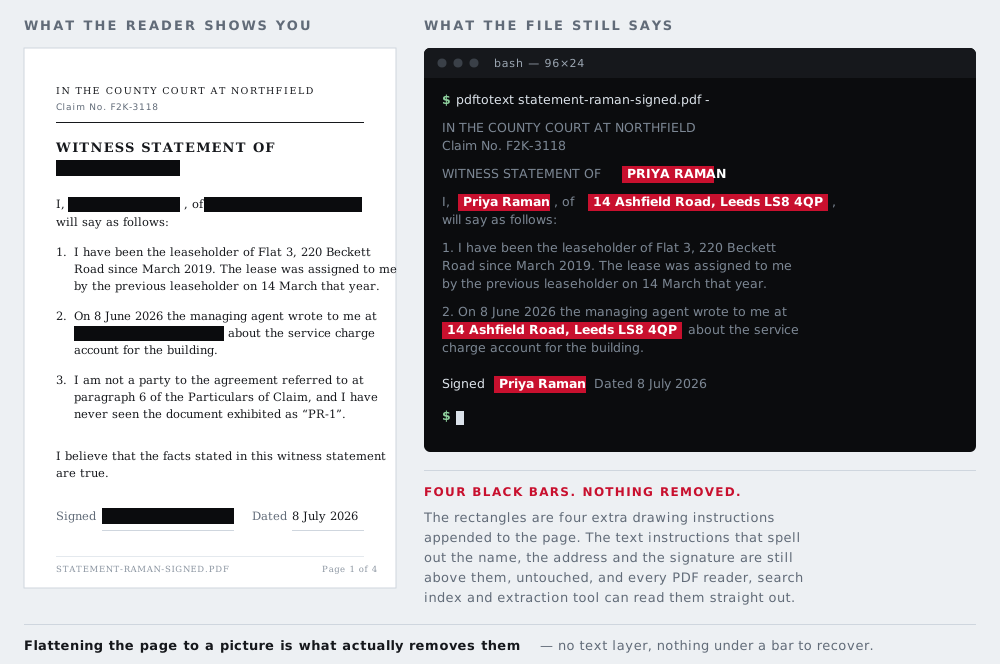
What a PDF actually contains
It helps to stop thinking of a PDF as a picture of a page. It is closer to a set of drawing instructions. One instruction says "place the string Jonathan Reeve in 11pt Times at these coordinates". Another says "fill this rectangle with black". The reader follows the instructions in order, so a rectangle drawn after the text lands on top of it.
Nothing removes the first instruction. The string is still there, in the file, in the order it was written. The black rectangle is a separate object that happens to be painted over it. When you select the region and copy, you are not copying the rectangle — you are copying the text object underneath, exactly as the author typed it.
The same is true of a highlight annotation set to black, a filled shape drawn in Preview on a Mac, a black-filled text box pasted over a word in Microsoft Word before printing to PDF, and a rectangle drawn with the comment tools in Acrobat. All of them add an object. None of them removes one.
Three times it went wrong in public
These are not hypothetical. They are documented failures in filings and reports that were read by people who knew to check.
Paul Manafort's court filing, January 2019
On 8 January 2019, lawyers for Paul Manafort filed a brief in federal court in Washington DC with passages blacked out. The black boxes had been added as markup over the text rather than applied as redactions, so highlighting the covered passages in the PDF and pasting them into a word processor reproduced them in full. Reporters did exactly that within hours, and the recovered text showed that Manafort had shared Trump campaign polling data with his associate Konstantin Kilimnik. The filing was pulled from public access and replaced with a properly redacted version — too late to matter.
The TSA screening manual, posted March 2009, noticed December 2009
The US Transportation Security Administration posted a redacted version of its Screening Management Standard Operating Procedure to the federal procurement site FedBizOpps as part of a contract solicitation. The redactions had been made by placing black rectangles over a Word document before converting it to PDF, so the text underneath survived and could be copied straight out. It sat there for months: the agency was alerted in December 2009, nine months after the posting. The recoverable material included sample credentials for various categories of traveller and detail on screening limitations. TSA took the document down, said it was an outdated version, and placed staff on administrative leave pending a review — by which point copies were mirrored across the internet.
The Calipari report, April 2005
The US military released its report into the shooting of Nicola Calipari — an Italian intelligence officer killed by American soldiers at a checkpoint in Iraq while escorting the freed journalist Giuliana Sgrena — as a PDF with substantial passages blacked out. The same copy-and-paste recovered the report in full, including the parts that had been withheld. Italian press published the recovered material within days. The Pentagon withdrew the file, but both versions were already widely mirrored.
The pattern across all three is the same. The document looked right on screen. It looked right when printed. It was reviewed by people who were paying attention. And it was wrong, because looking right is not the test.
Why "flatten it" is only half an answer
The usual advice is to flatten the document or print it to PDF, which rasterises the page into an image and does destroy the text layer. It often works. It also fails in ways that catch people out.
- Some "print to PDF" paths preserve text rather than rasterising it, particularly virtual printers that write a new PDF instead of a bitmap.
- Flattening the visible page does not necessarily strip document metadata, attachments, or an earlier version retained for incremental saving. A PDF that has been edited and saved incrementally can carry its own previous state inside it.
- If the black box was added as an annotation, some flattening operations preserve annotations as a separate layer rather than burning them in.
The reliable route is a tool with an actual redaction function — Acrobat's Redact tool, or a dedicated redaction utility — which deletes the underlying content objects and then applies the black mark. The distinction in the interface is the word: redact removes, draw covers.
Two routes avoid all three failures. The first is a tool with an actual redaction function — Acrobat's Redact tool, or a dedicated redaction utility — which deletes the underlying content objects and then applies the black mark, keeping the rest of the document live and searchable. The distinction in the interface is the word: redact removes, draw covers.
The second is to rasterise deliberately rather than hope that a print-to-PDF driver did. The PDF tool on this site takes that route: it renders each page to a picture, paints your boxes onto the pixels, and writes a new file containing nothing but those pictures — no text objects, no annotations, no incremental save history, and none of the original's document properties. It costs you the searchable text layer, which is a real loss and is the reason it is the second option rather than the first. It runs in your browser, so the document is not uploaded anywhere.
The same mistake in image files
Images have their own version of this. A black rectangle drawn on a new layer in Photoshop, GIMP, or Affinity is not part of the picture until the file is flattened. Save as PSD, XCF, or a layered TIFF and the layer stays separate — anyone opening the file can switch it off. Export a JPG or PNG and the layers are merged into pixels, which is what you want.
Screenshot annotation apps and the markup tools in phone photo galleries are usually safer, because most of them write a flat image. Usually is not always, and the safe habit is to check the exported file rather than trust the app.
There is also a subtler image version. Cropping a photo in some editors hides the cropped area rather than discarding it, and the full frame can be recovered. And an embedded EXIF thumbnail — a small copy of the picture stored inside the file — is generated when the photo is taken and is not always regenerated when the photo is edited, so it can still show the original scene. You can see whether a file carries one with the metadata tool on this site.
What genuine redaction looks like
Real redaction destroys the information rather than hiding it. For an image that means overwriting the pixels themselves and then writing a fresh file, so there is no layer, no earlier state, and no recoverable original.
That is what the tools here do. When you cover something with a solid bar and download the result, the browser rebuilds the image from the edited pixels. The covered area is a block of one colour. There is no text object underneath, because there was never a text object — only pixels, which have been replaced. You can black out text in an image or cover faces in a photo that way, and the exported file has nothing underneath to recover.
This is also why the site defaults to a solid bar rather than a blur. Blur and pixelation attenuate information instead of removing it, and for text — a short string from a small, known alphabet — that difference matters enormously. There is more on that trade-off in blur, pixelate, or black box.
How to check your own work
Four checks, in the order that catches the most for the least effort. Do them on the file you are about to send, not on the one you were editing.
- Select and copy. Open the finished PDF, select all, paste into a plain text editor. If the redacted words appear, you have not redacted anything.
- Search. Use the reader's find function to search for a word you removed. A search hit on an invisible word is the whole problem in one keystroke.
- Check the size. Genuine redaction of a large passage usually makes a file smaller. A file that grew after redaction has probably had rectangles added to it.
- Open it somewhere else. Try a different reader, and a browser's built-in PDF viewer. Different renderers handle layers and annotations differently, and one of them may show what another hides.
For images, the equivalent check is to open the exported file — not the project file — and confirm the covered area is a flat block of colour. Zoom in. A blur that looked opaque at page size can be surprisingly readable at 400%.
Why it keeps happening
Not carelessness, mostly. The failure is a design one: in almost every editor, the destructive tool and the cosmetic tool sit next to each other, produce identical results on screen, and differ only in a word most people have no reason to read closely. The feedback is also wrong — the moment you draw the box, the document looks finished. Everything about the interaction says the job is done.
The habit worth building is small: never trust what the page looks like. Check what the file contains.