Can AI un-blur a blurred face?
PUBLISHED 18 AUGUST 2026 · 8 MIN READ
Sometimes, for weak obfuscation. Effectively never, for a solid bar. And the demos that circulate under the heading "AI enhance" are doing something quite different from what most people assume they are doing.
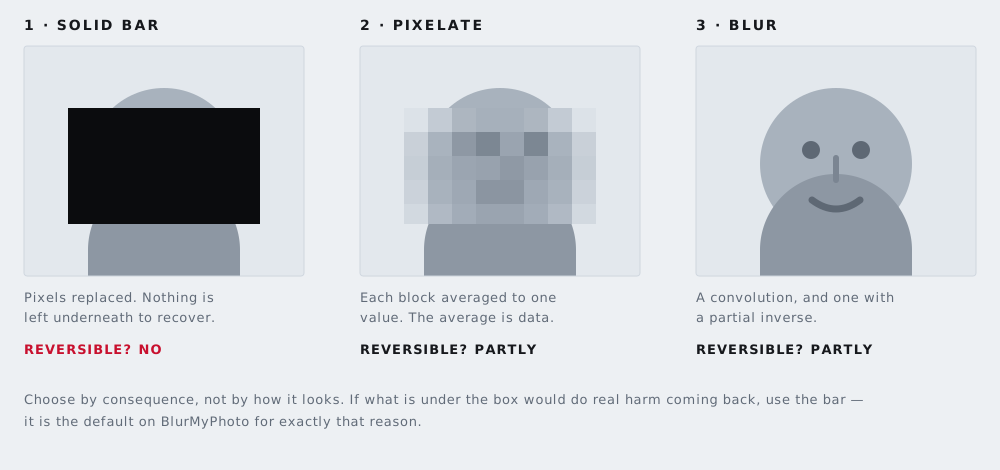
The short answer is three answers
The question hides three separate questions, and they have different answers.
Can a model take a lightly blurred face and produce something closer to the original? Partly. Blur is reversible in principle, and a weak blur leaves most of the underlying structure sitting there.
Can a model take a heavily pixelated face and reconstruct the actual person? No. It can produce a face that looks real and is consistent with the blocks you gave it. That is a different thing.
Can a model tell someone which of a short list of candidates a blurred face belongs to? Often yes, well above chance. That is the answer that should concern you, and it gets discussed the least.
What "AI enhance" actually does
The example most people have seen is PULSE, a face upsampling method from a group at Duke University led by Cynthia Rudin, posted to arXiv in March 2020 and presented at the Conference on Computer Vision and Pattern Recognition that June. It takes a 16×16 pixel image and produces a 1024×1024 one, a factor of 64 in each dimension.
The name misleads. PULSE does not start from the low-resolution image and add detail to it. It searches the output space of StyleGAN, a face-generating network, for a high-resolution face which, when shrunk back down, matches the input. The paper calls this the "downscaling loss". The output is chosen because it downscales correctly and looks realistic, not because it is the face that was there.
A very large number of different faces downscale to the same 16×16 grid, and the model picks one. Duke's announcement was direct about the limit: the system cannot be used to identify people, and it "won't turn an out-of-focus, unrecognizable photo from a security camera into a crystal clear image of a real person".
In June 2020 that limit was shown in public. A Twitter user ran a downsampled photograph of Barack Obama through Face Depixelizer, a notebook built on PULSE, and got back a white man. Others repeated it with Lucy Liu and Alexandria Ocasio-Cortez, with the same result. The authors traced it to StyleGAN's training data, which is overwhelmingly white, and added a discussion of the method's limitations and biases to the paper.
The bias is a serious problem in its own right. But note the second lesson. The model did not fail by producing a blurry or hedged result. It produced a sharp, specific, completely wrong face. That is how a system that generates rather than recovers fails: destroyed information does not come back, something plausible fills the gap, and it looks as convincing as a correct answer.
Why a plausible face can still be enough
Here is where the reassurance runs out. An attacker usually does not need to reconstruct your face. They need to decide which person you are, from a list they already have.
That problem was studied directly in "Defeating Image Obfuscation with Deep Learning", a paper by Richard McPherson at the University of Texas at Austin with Reza Shokri and Vitaly Shmatikov at Cornell Tech, posted in September 2016. They did not reverse anything. They trained neural networks on obfuscated images directly, teaching a classifier what each person looks like once pixelated or blurred, then asked it to identify new obfuscated images.
The threat model is stated plainly: the adversary needs "the set of possible faces that may appear in a given photo", which the authors argue is realistic for a social network, where most users' faces are public or known to the operator.
On FaceScrub, 530 identities where guessing scores 0.19 per cent, their network reached 75.49 per cent on untouched images. Against pixelation with 16×16 windows it still reached 57.56 per cent, and it climbed as the windows shrank: 65.25 at 8×8, 69.91 at 4×4, and 71.53 at 2×2 — within four points of its clean-image score.
On the AT&T face database, only 40 people, where guessing scores 2.5 per cent, pixelation barely registered: accuracy stayed near 95 per cent at every window size, matching the same network's score on untouched images. Against YouTube-style blurring it scored 57.75 per cent on its first guess and 85.75 per cent within its top five.
The closed-set assumption carries real weight, and it cuts both ways. These numbers do not transfer to picking a stranger out of the world's population. They transfer very well to picking one of your twelve colleagues, or one of the parents in a class group chat. Most real exposure is a closed-set problem, because the context around a photo supplies the candidate list.
The four methods, weakest first
Light Gaussian blur
The weakest option. A blur is a convolution: every output pixel is a weighted average of its neighbours. Convolution is linear, and linear operations have inverses — deconvolution is ordinary signal processing, not a research frontier. What stops a perfect inversion in practice is that the result is rounded to eight bits per channel and re-compressed as JPEG, which discards the small differences the inverse needs.
Radius decides the outcome. A six-pixel blur across a face four hundred pixels wide has smeared the detail, not removed it. The eyes are still darker than the cheeks, the jawline is still where it was, and every neighbourhood of pixels still encodes an average of what was underneath. Blur looks destructive to the eye long before it is destructive to the data.
Pixelation
Pixelation fails in a specific, arithmetic way: each block is the average of the pixels it replaced, and the image then publishes that average at full precision. The block does not hide the region. It summarises it.
Work it through. Say the face in a 12-megapixel photo occupies roughly 400×400 pixels. Pixelate at an 8-pixel block size and you have replaced it with a 50×50 grid of averages — 2,500 faithful measurements of small patches of a real face. At a 40-pixel block size you publish a 10×10 grid instead: 100 numbers, a twenty-five-fold reduction from one setting. The FaceScrub figures move in exactly that direction.
Pixelation also preserves what people forget to count: the outline of the head, the hairline, the average skin tone, and the eyes as two darker blocks. If you pixelate, use blocks large enough that the face is a handful of them. Our pixelation tool lets you set the block size and see the result at full resolution before you export.
Swirl and twirl distortion
A swirl is not destruction at all. It is a coordinate remap: each output pixel is read from a position rotated around a centre point, with the angle depending on distance from that centre. The transform is bijective — one input position for every output position — so it has an exact inverse. Apply the opposite rotation and the original comes back.
This is not theoretical. In 2007 Interpol launched a public appeal, Operation Vico, over more than two hundred images of child sexual abuse in which the man's face had been digitally swirled to disguise it. German police computer specialists reversed the distortion and produced clear images of the face, which Interpol published on 8 October 2007. Christopher Paul Neil was arrested in Thailand eleven days later.
Solid fill
The only one of the four that is not a transform of the pixels. An opaque block overwrites the values with a constant. There is no function to invert and no average left to leak: the numbers that described the face are no longer in the file. A model can still generate a face to sit in the hole, but only from the surroundings.
The catch with solid fill is procedural rather than mathematical. A rectangle drawn as a separate layer, an annotation in a PDF, or a shape in a design file often sits on top of intact pixels rather than replacing them, and a reader can remove it. We covered that in why a black rectangle is not redaction. Export a flattened image file and check it.
The face is rarely the only identifier
Every result above assumes the attacker starts with a candidate list. In practice the rest of the photo hands them one.
A house number, a school badge on a jumper, a delivery label, or the name of the group the photo was posted to will each narrow the field faster than any model. So will the file itself: many photographs carry GPS coordinates and a device identifier in their metadata, which our metadata stripper removes without touching the image. Text in the frame is worth covering with the black-out text tool first.
Be clear about what our own tools do here. Face detection on the blur faces tool runs automatically in your browser and finds faces for you. There is no automatic license plate detection anywhere on this site: on the license plate page you draw the box over the plate yourself. We would rather say that plainly than ship a detector that quietly misses a plate.
What this means when you post a photo
Match the method to the consequence. If the photo is going somewhere permanent, or the person in it did not consent, or being identified would cause them harm, use a solid fill. It is the only option where the honest answer to "can this be reversed" is no.
If you pixelate for how it looks, set the block size large. A face reduced to a 10×10 grid of blocks has given up far less than one reduced to a 50×50 grid, and the visual difference is smaller than you would expect.
Treat blur as an aesthetic choice rather than a protective one. It is the gentlest of the three modes and it behaves that way. If you reach for it because a solid bar looks harsh, that is a real reason — just know what you are trading. We compared the three in blur, pixelate or black box.
Whichever you choose, export a new flattened file and open it fresh before sending it. Then look at everything that is not the face.
Everything here runs inside your browser. The photo you open is decoded, edited and exported on your own device, and is never uploaded. That is also why the export is genuinely flattened: there is no layer left to peel back.