Redact a PDF, and have the words actually be gone
Free forever. No sign-up, no watermark, no limits — ads keep it that way.
Cover a name, an address or an account number, and download a file where nothing survives under the box. The document is opened by your browser and never leaves your device.
The rectangle is not the redaction
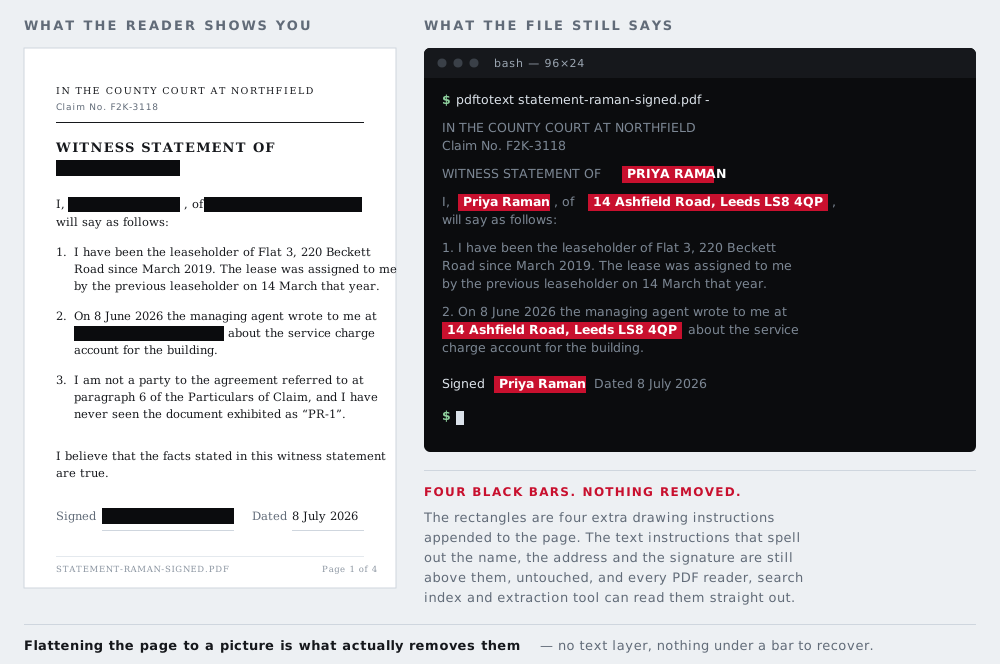
A PDF is not a picture of a page. It is a list of instructions for drawing one: put this string of characters at this position in this font, then stroke this line, then fill this rectangle. The instructions are kept separately and executed in order, which is what makes a PDF searchable and what makes the text in it selectable.
It is also what makes the obvious approach to redaction fail. When you draw a filled black rectangle over somebody's name in a PDF editor and save the file, you have added one instruction to the end of the list. The instruction that draws the name is still there, unchanged, a few lines above it. Your viewer paints the name and then paints black over the top, and the page looks finished.
The name is still in the file. Select the area and copy it, and it lands in your clipboard. Search the document and it is found. Open the file with a text extraction tool and it comes out in a list with everything else. None of this requires special software or any particular skill — the standard command-line utility that does it ships with most Linux distributions and is a single line.
This is not a theoretical risk that security people enjoy talking about. It has exposed the names of protected witnesses in court filings, the identity of an intelligence contractor in a defence report, unredacted settlement figures in litigation between large companies, and the personal details of applicants in documents published by public bodies who believed they had redacted them. Every one of those was a black rectangle over live text. We wrote up several of the documented cases in why a black rectangle is not redaction.
What this tool does instead
It removes the text layer entirely.
Each page of your document is rendered to a picture — the same picture your PDF reader would show you — and your boxes are painted onto those pixels, replacing them. A new PDF is then written containing nothing but those pictures, one per page. There are no text objects in the result, no fonts, no annotations, and no layers. There is nothing under the box because there is no "under" left in the file.
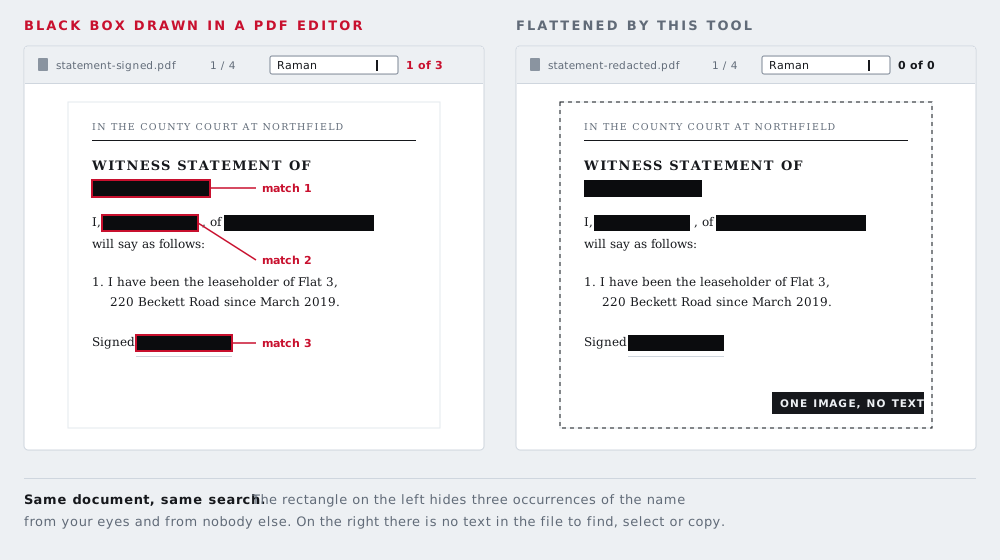
That is a blunt instrument and it is the right one, for the same reason a solid bar rather than a blur is the default on the rest of this site: when the consequence of being wrong is that a name gets out, the tool should not be doing anything clever. It should be doing something you can check in five seconds, which the last section of this page shows you how to do.
What you give up, stated plainly
Flattening a document costs you real things. Anybody who tells you otherwise is selling something.
- Searchable text
- The redacted file cannot be searched, and text cannot be selected or copied out of it. That is precisely the property that makes it safe, so it cannot be given back.
- Screen reader access
- This is the serious one. A flattened PDF is a picture to assistive technology, and a blind reader cannot read it at all. If the document is going to a person rather than into a public archive, put a plain-text or accessible copy of the non-sensitive parts alongside it. Do not silently hand somebody a file they cannot read.
- File size
- A page of text is a few kilobytes as text and a few hundred as a picture. A long report will get substantially larger. The detail setting in the tool controls this directly.
- Reflow and zoom
- Text in a normal PDF stays sharp at any magnification. A flattened page is a picture, so it goes soft when you zoom past the resolution it was rendered at.
- Form fields and signatures
- Interactive form fields, embedded attachments and digital signatures do not survive flattening. A signature panel that said "signed by" will be gone; the visible ink of a hand-drawn signature stays, as part of the picture.
Weigh that list against the alternative honestly. If the document contains something whose exposure would harm a person, none of the costs above competes with the risk of publishing a file that only looks redacted.
When to use this, and when not to
Use it when a document is going somewhere you cannot take it back from: a public filing, a planning portal, a Freedom of Information response, a screenshot in a news story, a contract sent to a counterparty, a bank statement sent to a landlord, an invoice going to an accountant who does not need to see your other clients.
Use proper redaction software instead if you are producing documents professionally at volume — a law firm doing disclosure, a records team answering statutory requests. Adobe Acrobat Pro's redaction feature and the tools built for legal disclosure remove the underlying text and keep the rest of the document live and accessible. They cost money and they are worth it at that scale.
Do not use it as a substitute for thinking about what is in the file. Flattening protects what you put a box over. It does nothing about the paragraph on page 9 that identifies somebody by circumstance rather than by name, and it will not save you from a filename like smith-tribunal-final.pdf.
How to use the tool above
- Open the document. Drop it on the box or tap it to pick a file. It is read by your browser; nothing is sent anywhere at any point.
- Work through every page. The strip along the top shows a thumbnail per page and a count of the boxes on each, so you can see at a glance which pages you have actually looked at. Missed pages are how documents leak.
- Drag a box over each thing that should not be readable. Solid black is the default. Pixelate and blur are available for cases where the shape of a thing should stay visible, but do not use them on text — text is easy to reconstruct from a blur, which is explained on the black out text page.
- Copy repeated boxes. If the same letterhead, footer, case reference or account number appears on every page, cover it once and use Copy to every page. Then check the pages anyway — the same position is not always the same content.
- Choose the detail, and download. Compact for something read on screen, Print if it is going to paper. The file is rebuilt page by page in your tab, so a long document takes a moment.
Check the result yourself — it takes five seconds
Never trust a redaction you have not tested, including this one. Open the file you just downloaded and do any of these:
- Press Ctrl+F (Cmd+F on a Mac) and search for a word you know is on the page — one you did not cover. A correctly flattened file finds nothing at all, because there is no text in it to find. If your search finds anything, the file still has a text layer and you are not looking at output from this tool.
- Select all with Ctrl+A and try to copy. Nothing should land in the clipboard.
- Run pdftotext yourfile.pdf - if you have poppler-utils installed. The output should be empty.
- Zoom in hard on each box. What is under a solid bar is a flat rectangle of one colour, with no ghost of a letterform at any magnification.
Run the same tests on the original file before you redact it, so you can see the difference for yourself rather than take our word for it.
Nothing is uploaded, and you can prove it
The document is read by your browser with the File API, rendered on your own processor and written back out to your own disk. This site is static files. There is no server-side code, no upload endpoint, no account, no storage. Your PDF is in one tab's memory and it is gone when you close the tab.
You do not have to believe that. Open your browser's developer tools, switch to the network tab, and redact a document while watching it — you will see the page, the fonts, and the PDF rendering library being fetched, and no request carrying your file. Or switch your network off entirely after the page has loaded and redact a document in aeroplane mode. How it works sets out four such tests in detail.
One thing does get fetched from the network the first time you open a PDF: Mozilla's pdf.js, the same PDF renderer built into Firefox, downloaded from a public code CDN. It is a program, it arrives before your file is read, and it goes nowhere afterwards. It is listed on the credits page with everything else this site borrows.
Questions
Why is drawing a black rectangle in a PDF editor not enough?
Because a PDF keeps text and graphics in separate objects. A rectangle is painted on top of the characters; it does not replace them. The words are still in the file, and anyone can select them, copy them, search them, or read them out with a command-line tool in a second. Newspapers, courts and government departments have all published documents redacted this way and had the covered text read straight back out.
What does this tool do differently?
It renders each page to a picture, paints your boxes onto the pixels, and writes a new PDF containing only those pictures. There is no text layer in the result, so there is nothing under a box to recover. The trade is that the file is no longer searchable or selectable — which is stated plainly in the tool, because it is a real cost.
Is my document uploaded anywhere?
No. The PDF is opened by your browser, rendered on your own device and written back out on your own device. This site has no server-side code and no upload endpoint. You can watch the network tab while you use it, or finish a document with your Wi-Fi switched off.
Does the redacted file still contain the original metadata?
No. The new file is written from scratch and carries no author name, no title, no producing software and no path to the folder the original was saved in. A PDF's document properties routinely carry all four, and they are a common accidental disclosure in their own right.
Can it find names or account numbers for me?
No, and that is deliberate. There is no reliable in-browser model for finding personal data in an arbitrary document, and a detector that quietly missed one name in ten would be worse than no detector, because it would be trusted. You draw the boxes and you can see that they landed.
Will the redacted PDF still print properly?
Yes. Page sizes are preserved exactly, in points, so an A4 page stays A4 and a Letter page stays Letter. Choose the Print detail setting if the file is going to paper; it renders pages at roughly 260 dots per inch.
Is there a page limit or a watermark?
No watermark, no account, no daily cap. There is a limit of 120 pages per document, which is a memory limit in the browser rather than a commercial one — past that a phone runs out of room rendering the pages.
What about a scanned PDF?
A scan is already a picture of a page, so there is usually no text layer to worry about — unless it has been through OCR, in which case there is one and it is invisible, which is worse. Flattening it here removes any OCR layer along with everything else, so a scanned document comes out safe either way.
My PDF is password-protected and will not open.
Open it in your usual PDF reader, save an unprotected copy, and bring that one here. This page deliberately does not ask you for a document password — a password box on a web page is a thing you should be suspicious of, and we would rather not train anybody to type one in.
The other six tools
Same editor underneath, same promise: the file is opened by your browser and never uploaded. Pick whichever matches the thing in front of you.
-
Blur faces in a photo
The only one here with automatic detection. Group shots, a school play, strangers in the background of a street scene.
Automatic · bar, pixelate or blur
-
Blur a license plate
Before a car advert goes online. Drag one box over the plate and the characters are replaced rather than smudged.
One box · irreversible
-
Pixelate part of a photo
Starts in pixelate mode, for when the shape of a thing should stay readable but the detail of it should not.
Pixelate · adjustable block size
-
Black out text in an image
An address on an envelope, a name on a form, a booking reference. Solid bars, with nothing left underneath them.
Solid bar · nothing recoverable
-
Blur a screenshot
An email address, a chat name, a bank balance — covered before the grab goes into a thread or a support ticket.
Screens · PNG in, PNG out
-
Strip photo metadata
No bars at all. It reads what your file is carrying, GPS coordinates included, and writes you a clean copy of it.
EXIF · GPS · camera serial