Photos for a property listing: what to check before you publish
Twenty photos, ten minutes, and an upload waiting. This is the pass to make before the listing goes live: what to look for in each frame, what has to be covered, and what is quicker to reshoot than to fix.
Work from the full-size files, not the thumbnail grid. Thumbnails hide the things that cause trouble later — a name on a school certificate, a face at the window opposite, a registration on the drive. On a phone, pinch into each corner of each shot. Nearly everything below sits at the edge of the frame or inside something that reflects, and both survive a quick glance at a 300-pixel preview. For the longer account of how these get published in the first place, read what estate agents miss in listing photos. This page is the checklist itself.
The pass, in the order that finds the most
Windows and glass
- People beyond the glass: a neighbour at their own window, someone on the pavement, a face in a doorway across the street.
- You. The photographer turns up in bay windows, glazed front doors and patio glass more often than anywhere else, camera and tripod included.
- The street behind you, reflected: house fronts, door numbers, parked cars, a liveried van.
- Net curtains and blinds in a bright interior shot. They conceal less than they appear to once the exposure is lifted for the room.
- Conservatory panes and skylights, which reflect the garden next door.
The reflective surfaces people forget
Mirrors in the hall and the bathroom are obvious. These are the ones that get missed:
- A television that is switched off. A dark screen is a mirror pointed straight at the room.
- Oven doors, microwave fronts, kettles, taps, splashbacks and extractor hoods.
- The glass in framed pictures, which can carry a legible second room.
- Mirrored wardrobe doors and the shower screen.
- Gloss worktops and induction hobs.
- Polished car paint on the drive, which holds a small but readable reflection of whoever stands in front of it.
The vendor's private life
- Family photographs on walls, mantelpieces, the fridge door and the stairwell.
- Children's names: door plaques, wooden letters over a bed, a name tag on a school bag or a peg in the hall.
- School artwork, certificates and reports carrying a full name and the school.
- Medication, prescriptions and repeat slips on bedside tables and kitchen counters.
- Post, bank letters, cards and payslips on hall tables and worktops.
- Calendars, whiteboards and pinboards with appointments, hospital dates, names and numbers.
- Religious and political items, and anything else that shows what somebody believes.
The last three carry more weight than the rest. Information about a person's health, religious beliefs or political opinions is special category data under UK GDPR, and the ICO's guidance on what counts as special category data sets out why it is held to a higher standard than an ordinary name. The better answer is usually to move the object before the shot, not to cover it afterwards.
Security details
The address is on the listing anyway, so the house number in a photo is rarely the risk people imagine. What is worth covering is anything that describes how to get in:
- Key safes: the box itself, and where on the wall it is mounted.
- Alarm panels close enough to read the make, and the sounder box on the front elevation.
- Door and window locks at a readable size, including the front door cylinder.
- Side gates, back gates, unlit passages and gaps in a fence. Show the garden without mapping the route into it.
- Open windows, propped doors and restrictors that have been taken off.
- A house number painted on a wheelie bin, which as often as not belongs to the neighbour rather than to the property being sold.
Vehicles
- Registration plates on the drive, at the kerb and in the background of every exterior shot. The neighbours' as much as the vendor's.
- Personalised plates, which point at one household far more directly than a standard one.
- Trade livery on a van: a name, a mobile number and a business in a single frame.
- Parking permits and residents' badges in windscreens, which usually carry an address.
A registration identifies a vehicle, and through records held elsewhere it leads back to a keeper. Cover it. There is no automatic plate detection on this site, and the reason is worth saying plainly: no reliable, permissively licensed plate model runs inside a browser. Plates are drawn by hand instead, one box per car, on the license plate tool. If the vendor is also selling the car, the same points apply to those photos — see selling your car online.
Screens that were left on
- A laptop or tablet on the kitchen table showing an inbox, a notification banner or an account name.
- A television paused mid-programme, or resting on a home screen with the household's profile name.
- Smart displays, video doorbell feeds and baby monitors.
- A phone left face-up on a worktop.
Cover the whole screen with a solid bar rather than picking off one line of text. Screens are also where resolution catches people out: what reads as a grey smudge in the portal thumbnail is a subject line in a 4000-pixel-wide original, and the original is the file being uploaded. If a screenshot has to be published on its own, the screenshot tool works the same way.
Outside, and the neighbours
- People in their own gardens, at their windows, or walking past the front elevation.
- Children playing in the street or next door.
- Delivery drivers, and vans with a driver's name on the door.
- Neighbouring door numbers, name plaques and cars.
- Drone and elevated shots, which look over fences into gardens that are not part of the sale.
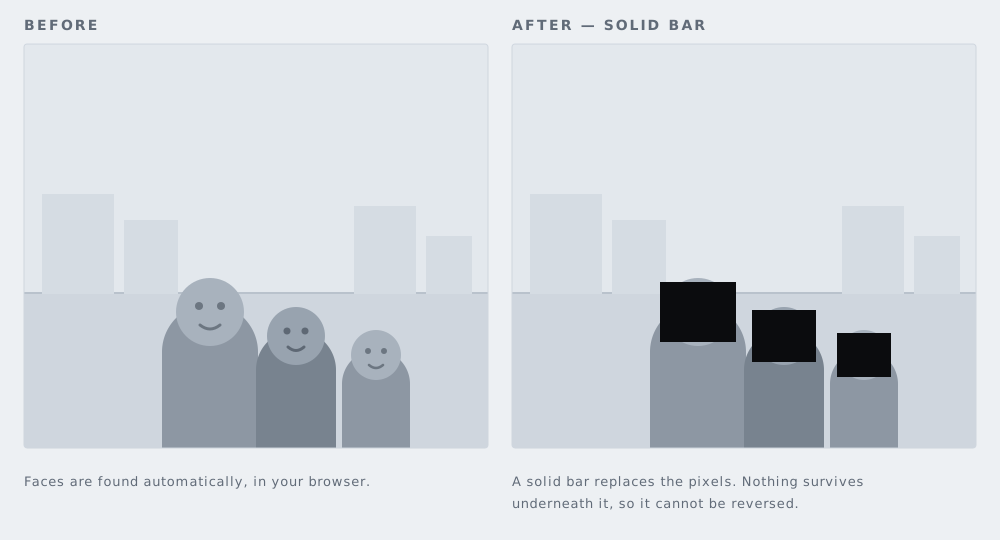
Faces are the one item on this list the site can find for you. Pick a file and the face blurring tool downloads Google's MediaPipe BlazeFace model into your browser and marks the faces it finds. Check its work instead of trusting it: small, side-on and partly obscured faces are the ones it misses, and those are exactly the faces that appear in listing photos.
Redact or reshoot
Reshoot when the fix would sit on top of the reason for the photo — the mirror over the fireplace, the window that sells the room, the island in the middle of the kitchen. Reshoot when one frame needs three or more covered areas, because past that point the picture reads as a redaction rather than a room. Reshoot when the item is large and central.
Redact when the thing is small, off to one side or in the background: a plate at the kerb, a letter on a hall table, a face at a window across the road. Redact when the vendor has moved out, when the light has gone, or when the listing has to go live before anyone can get back to the property.
Better than either: five minutes at the start of the shoot clearing surfaces and turning frames face down, with the vendor in the room agreeing to what goes away. Editing an object out later is not the tidy escape it looks like. Rightmove's agent and developer technical guidelines class manual removal of objects as an "Enhanced Edit", which must be clearly labelled and accompanied by current, accurate images of the room. The same guidelines say images must not contain text, so a caption cannot be used to explain a problem away either.
When the vendor asks for a photo to come down
Treat it as a job for today rather than a conversation. Then work through it in this order:
- Fix the source first. Replace the image in the CRM or feed that supplies the portal, not only at the portal end. If the file is still in the feed, the next update can put it back. Rightmove states that automatic feed updates appear on its platforms within 24 hours, and that changes made in Rightmove Plus during business hours appear within 15 minutes.
- Replace rather than delete. A gallery that drops from 18 photos to 17 with a gap in the sequence draws more attention than a redacted frame does.
- Do every copy. The set usually exists on more than one portal, on your own website, in a PDF brochure, on a window card and in scheduled social posts. Write the list, then work the list.
- Overwrite your master file. Otherwise the original returns the next time somebody re-uploads the folder.
- Reply to the person who asked. If the request came from a neighbour or a passer-by rather than the vendor, it may be a request to erase personal data. The ICO's guidance on the right to erasure sets out when that right applies and what an organisation is expected to do about it.
Doing the redaction here, in four steps
- Open the photo. Choose a file. It is decoded by your own browser and never uploaded, to us or to anyone, which is what makes it usable on a client's photographs. JPG, PNG, WebP, GIF, BMP, AVIF, SVG, HEIC/HEIF and TIFF are accepted.
- Let the faces be found, then draw the rest. Once you pick a file, the browser downloads Google's MediaPipe face detection model and marks the faces it finds. Everything else is a box you drag: plates, post, certificates, screens, key safes, a name on a door. Plates and documents are always drawn by hand.
- Choose how each box is covered. A solid black bar is the default and cannot be undone. Blur and pixelation can sometimes be partly reversed, so keep pixelation for things that are merely untidy and use a solid bar for a face, a plate, a name or an account number. Text is a case of its own: the black out text tool defaults to the bar for that reason.
- Export, then upload the export. PNG at the original resolution, or JPG where the portal or CRM prefers a smaller file. No watermark, no sign-up, no limit on how many photos you run through. Re-encoding also strips EXIF metadata, GPS coordinates included, which matters for anything shot on a phone at the property. If a photo needs nothing but that, the metadata stripper does it on its own.
RAW files are refused rather than half-decoded, because browsers cannot decode CR2, CR3, NEF, ARW and their relatives dependably. Export a JPG or TIFF from your editing software and redact that. Still images only — this is not a video tool, so virtual tours and walkthrough clips have to be edited elsewhere.
What the portals require
Image rules are set by each portal, and they change. Two current examples, both from the portals' own documents:
- Rightmove's agent and developer technical guidelines dated January 2026 state that your advert must not contain "any photographs or static or animated images by which any living person can be identified", unless you hold a Rental Operator or Commercial membership. The same paragraph requires third-party intellectual property in images to be blurred so that it is not identifiable, and Rightmove reserves the right to suppress or remove member data it believes contravenes its terms. The guidelines are published as a PDF: Rightmove agent and developer technical guidelines.
- Zoopla's member terms and conditions say that listing content must not contain personal data, and that Zoopla may limit a property to 20 images.
Rightmove also restricts watermarks: white on photographs, greyscale on floor plans, no larger than a quarter of the image, at 30% opacity or lower. Exports from this site carry no watermark at all, so that rule takes care of itself.
Check the current version for every portal you feed, then check it against your own agency's data-protection policy. That policy is the document that says who signs a listing off, who answers a removal request and how quickly. If your agency does not have one, the gap is worth raising before a photo makes it public rather than after.
Questions
Is a blur enough, or does it have to be a solid bar?
Blur and pixelation rearrange pixels that are still on the page, and part of what they hide can sometimes be recovered — particularly on a small region with a strong pattern, such as a registration plate. A solid bar replaces those pixels, so there is nothing left to recover. For a face, a plate, a name or an account number, use the solid bar. The trade-offs are set out in blur, pixelate or black box.
Does the site find license plates automatically?
No, and that is deliberate. Faces are found by Google's MediaPipe BlazeFace model, which is small enough to run in a browser and free to use. There is no equivalent plate model with a licence that allows the same thing, so plates are drawn by hand: one box per car, a few seconds each.
Do the photos get uploaded anywhere?
No. The page decodes, edits and exports the image inside your browser. Nothing is sent to us or to anyone else, so a client's property photos never leave the machine you are working on.
My camera files are RAW. Can I use those?
No. RAW files are refused rather than half-decoded, because browsers cannot decode them dependably across makes and models. Export a JPG or TIFF from your editing software and redact that, which is the file the portal wants in any case.