Blur a screenshot before you post it
Free forever. No sign-up, no watermark, no limits — ads keep it that way.
Drop the screenshot in and cover what should not travel with it.
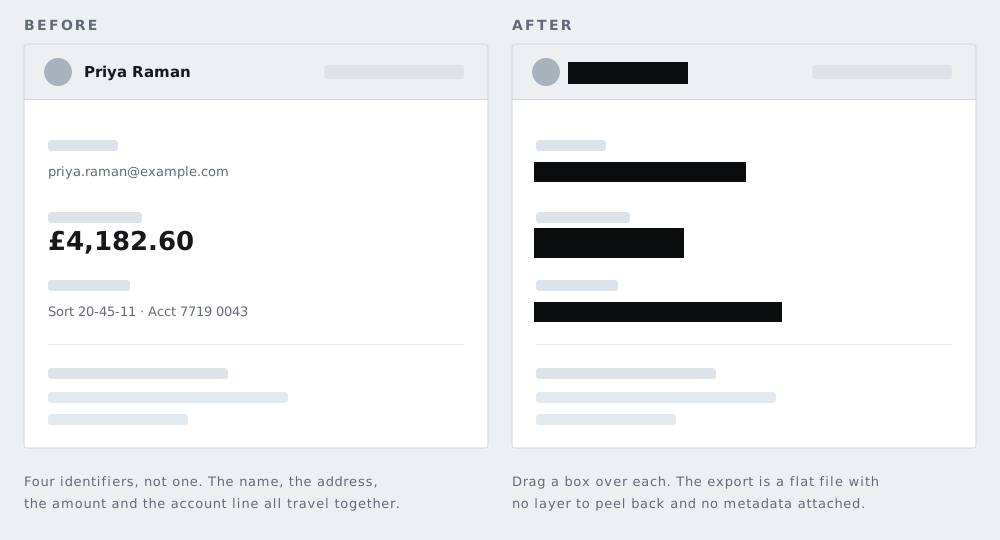
A screenshot is not a photograph
A photograph leaks the physical world: a street sign, a face, a plate. A screenshot leaks your accounts, your correspondents, your software, and your habits — and almost none of it is a face. The automatic face finding on this site will typically find nothing at all in a screen capture, which is correct and not a failure. Everything here is covered by hand, and knowing what to cover is the entire skill.
What follows is an inventory, arranged by where things sit on the screen, because that is the order your eye can actually check.
The status bar
The strip most people never look at. It carries the mobile network name, the exact time, the battery percentage, whether an alarm is set, and sometimes a VPN or location indicator. Individually trivial; together they place you, time you, and can corroborate or contradict an account of where you were. If the screenshot is going anywhere contentious, cover it.
Notifications and the shade
Banners arrive at the worst moment and get captured. A message preview publishes someone else's words under their name, and they had no say in it. If you pulled down the notification shade, you may have captured a dozen previews at once.
The account you are signed into
Your own handle, display name, and avatar usually sit in a corner and become invisible to you through familiarity. In a work tool that corner may also show your full name and your employer.
Messaging apps
The most-shared and most-leaked category. Check for:
- The other person's name, photo, and — in the conversation header — their phone number
- Read receipts and timestamps, which reveal when you were both awake and how quickly you reply
- The messages above and below the part you meant to share, which are usually still in frame
- Group member counts and group names, which can identify a workplace or a family
There is also a question that is not technical: the other person wrote to you, not to your followers. Covering their name is the minimum; deciding whether to post it at all is the real question.
The browser
- The address bar, which may carry a session token, an account identifier, or an internal hostname in the query string
- Other open tabs, which describe what else you were doing
- The bookmarks bar, which is a short biography
- Autofill and search suggestions, which come from your history
- Installed extensions in the toolbar
Desktop captures
A window title bar often contains a full file path including your username. Behind the window sit your wallpaper, your dock or taskbar, and frequently a file browser sidebar listing project or client names. Calendar notifications are the classic accident: a meeting title can disclose a deal, a diagnosis, or a resignation.
Work software
Internal project code names, client names, ticket numbers, colleagues' names in a sidebar, and internal URLs that reveal which systems your employer runs. Much of this is not secret individually and is still not yours to publish.
The header block — sender, all recipients, subject, date — plus any quoted thread underneath. A screenshot of a reply routinely publishes the email addresses of everyone who was ever copied in.
The one people miss
A screenshot of a page you are signed into proves that you have access to it. That is information in itself: about your employment, your membership, your account tier, or your role. Sometimes the fact of access matters more than anything visible on the screen.
A practical order of work
- Capture less. Most systems can capture a selected region rather than the whole screen; use it.
- Crop before covering. Removing pixels beats hiding them, and the result reads better.
- Cover what is left with a solid bar — text is the main risk here, and text is the one thing a blur does not protect.
- Look once more at the edges of the frame before you download.
If the screenshot is of a document or a receipt, the list of things worth covering is on the black-out text page. If you are sharing a photograph rather than a capture, run it through the metadata tool as well, since a photo carries a position fix and a screenshot does not.
Questions
Does a screenshot contain GPS data?
Not a position fix, no — your phone is not recording where you were standing when you took it. It does record when it was taken, and on some devices the device model and the app. The picture itself is the bigger disclosure.
Can I crop instead of covering?
Usually yes, and usually you should. Cropping removes the pixels entirely and produces a smaller, cleaner image. Cover things only when they sit in the middle of what you actually want to show.
Is a phone screenshot lower quality than a photo?
It is a straight capture of the screen, so it is exactly as sharp as what you saw. That includes any small text, which is often more readable in the file than it looked on the screen.
What about the other person in a conversation?
They did not choose to be published. Cover their name, their picture, and any part of the thread you are not specifically discussing — and consider whether you need their side of it at all.
The other six tools
Same editor underneath, same promise: the file is opened by your browser and never uploaded. Pick whichever matches the thing in front of you.
-
Blur faces in a photo
The only one here with automatic detection. Group shots, a school play, strangers in the background of a street scene.
Automatic · bar, pixelate or blur
-
Blur a license plate
Before a car advert goes online. Drag one box over the plate and the characters are replaced rather than smudged.
One box · irreversible
-
Pixelate part of a photo
Starts in pixelate mode, for when the shape of a thing should stay readable but the detail of it should not.
Pixelate · adjustable block size
-
Black out text in an image
An address on an envelope, a name on a form, a booking reference. Solid bars, with nothing left underneath them.
Solid bar · nothing recoverable
-
Redact a PDF
A document rather than a picture. Every page is flattened, which is the only way a black box over PDF text is worth anything.
Up to 120 pages · no text layer left
-
Strip photo metadata
No bars at all. It reads what your file is carrying, GPS coordinates included, and writes you a clean copy of it.
EXIF · GPS · camera serial