Blurring faces in dashcam footage
Published 28 July 2026 · 7 min read
You have a clip of the moment another car pulled across you. Three different parties might end up with it: your insurer, the police, and whoever reads your post about it. Only the last one should get a redacted version.
Decide who the footage is for
A dashcam file is evidence first and content second, and that order matters. The treatment that makes a file safe to publish is the same treatment that weakens it as evidence.
If you are handing footage to an investigator — a police force, a claims handler, a solicitor — you generally do not redact it at all. Send the original file straight off the card. The National Dash Cam Safety Portal, the route most forces in England and Wales use for public submissions, says so in its own FAQ: all that is required is a copy of the original file in unedited, uncompressed format. Blurring a face or trimming the clip opens a gap between what the camera recorded and what the investigator receives, and that gap is what the other side will ask about.
Data protection law does not push you the other way either. The Irish Data Protection Commission's guidance for drivers on the use of dash cams notes that giving footage to law enforcement may be permitted under section 41 of Ireland's Data Protection Act 2018, where the authority can show it is necessary for investigating or prosecuting an offence, and that the request should be made in writing. Handing evidence to an investigator and broadcasting it are different acts, and the law treats them differently.
Whatever you do next, keep the untouched original somewhere safe and work on a duplicate. If a claim turns contested six months later, the file nobody edited is the one that carries weight.
This site handles stills, not video
Being plain about it: BlurMyPhotos is a still-image tool. It opens a photo in your browser, lets you cover regions of it, and hands the photo back. It does not open MP4 or MOV files and it cannot step through a clip.
So if you need a whole sequence redacted — thirty seconds in which a pedestrian stays recognisable throughout — you need different software. The category to search for is video redaction or video anonymisation: tools built to track a face or a plate across frames as it moves. General video editors will also do it with a blur effect and manual keyframes, slower but predictable; DaVinci Resolve, Adobe Premiere Pro, Final Cut Pro and the open-source editors Shotcut and Kdenlive all have the pieces.
What this site is good for is the frame. And the frame is usually what you wanted to post anyway: the moment of impact, the readable plate, the car halfway across the line. One well-chosen still says more than half a minute of motorway.
Pulling a single frame out of a clip
On a phone
Get the clip into your photo library first, from the camera's own app or off the memory card. On Android, recent versions of Google Photos let you open a video, tap the edit control, scrub to the moment and export that frame as a photo; it lands in your library as an ordinary image.
The Photos app on iPhone has no equivalent export-frame button, so you have two routes: pause the video, wait for the on-screen controls to fade and take a screenshot, or install one of the frame-grabber apps on the App Store. The screenshot is faster, but it captures at your screen's resolution rather than the video's and may pick up interface elements, so crop it first.
On a desktop
VLC is the shortest path and runs on Windows, macOS and Linux. Open the clip, pause just before the moment you want, then press E to advance one frame at a time until the frame is right. Take the still with Video › Take snapshot, or the shortcut Shift + S on Windows and Linux, Option + Command + S on macOS. VLC writes a PNG at the video's own resolution into your pictures folder.
If you already have FFmpeg installed, one line does the same thing at an exact timestamp:
ffmpeg -ss 00:00:12.400 -i front.mp4 -frames:v 1 frame.pngWhat to redact in a dashcam still
Four things, in rough order of how often they get missed.
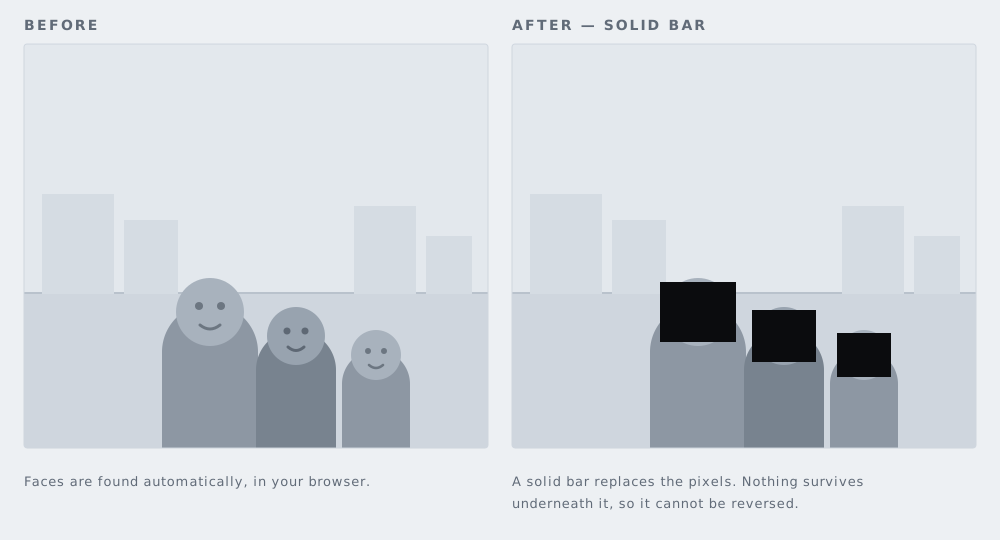
- Other people's faces. Anyone in another vehicle, on the pavement, waiting at a crossing. Automatic detection on the blur faces tool proposes boxes over the faces it finds, but check its work: a face at three-quarters, behind windscreen glare, or small in the distance is often missed.
- Every license plate, including your own. Your own bonnet is in shot on plenty of windscreen-mounted cameras, and your plate can also turn up in a wing-mirror reflection or on a rear-facing clip. Cover each one on the license plate blurring page.
- Location giveaways. House numbers, a business name board, a school sign, a street name plate. If you would not post your address, do not post the frame that spells out where you were. The black out text tool is the right shape for these, because a solid bar removes the characters rather than smearing them into something a reader can still guess at.
- The dashcam's own data strip. Its own section, below.
The three covering methods are not equally strong. Light blur on small text can sometimes be worked backwards; a solid bar cannot, because the pixels underneath are gone. We go through the trade-offs in blur, pixelate or black box. For anything that carries an identifier — a plate, a name, a number — use the bar.
The overlay burnt into the pixels
Most dashcams stamp a strip of data across the top or bottom of the recording: date, time, speed, and on GPS-equipped models the latitude and longitude. Some add heading, altitude or a satellite count. This is the item people forget, and it leaks more than anything else in the frame.
The critical point is that the strip is not metadata. The camera draws it into the video before the file is written, so it is made of exactly the same pixels as the road surface. Stripping EXIF from your exported still will not remove it, and no metadata tool can, because there is nothing in the file's metadata to strip. What the metadata stripper reaches is a separate job from this one.
A frame with coordinates burnt in tells any reader precisely where you were and how fast you were going at that second. If you are publishing because you believe the other driver was at fault, your own speed reading is the first thing a hostile reply will screenshot. Cover it with a bar, or crop the strip off entirely if it sits in a clean band at the edge.
Worth doing once, on the camera itself: many models let you switch the speed or GPS stamp off independently of the timestamp. That only affects future recordings, though. Footage already on the card keeps whatever stamp it was recorded with.
A worked example
Say a car has gone into the back of you at a junction and your rear camera caught it. The whole sequence takes a couple of minutes.
- Copy the entire clip off the card into a folder and leave it alone. That file is what goes to your insurer, and to the police if they ask for it.
- Open a copy of the clip in VLC. Step to the frame where the other car's plate is sharpest and the position of both vehicles is legible.
- Take a snapshot of that frame.
- Open the snapshot on the blur faces tool, run detection, and check the boxes it proposed. Add one over the driver's face if the windscreen reflection defeated it.
- Switch to drawing solid bars, and cover the other car's plate, the sliver of your own plate in the corner, the house number on the wall behind, and the GPS strip along the bottom edge.
- Export, and post that single image.
Your insurer gets an unedited clip. The internet gets one frame with five rectangles on it. The two versions never meet, and neither one is compromised by the other.
Where the law sits, roughly
Recording with a dashcam for your own purposes generally sits inside what data protection law calls the personal or household exemption, and so outside the rules. Publishing is where that changes. The Information Commissioner's Office, in its guidance on dashcams and UK GDPR, states that if a driver posts dashcam recordings online, the processing of personal information the dashcam captured is no longer in the course of the driver's personal activity, that it falls within the scope of the UK GDPR, and that the driver will need to identify an appropriate lawful basis for it.
The EU position runs on the same logic. The Court of Justice of the European Union held in Ryneš (C-212/13, December 2014) that a home camera covering even part of a public space is not a purely personal or household activity. In Buivids (C-345/17, February 2019) it held that someone who films identifiable people and uploads the video to a site where anyone can watch it falls inside data protection law rather than outside it. The Irish DPC applies that reasoning directly to dashcams: publication to an indefinite audience, such as a fully public social media channel, cannot be considered to fall within the personal or household exemption.
The European Data Protection Board wrote to the MEP Moritz Körner on 5 May 2025 about in-car video cameras and dashcams, noting that the subject is governed by differing national requirements and pointing back to its Guidelines 3/2019 on video devices, in which the household exemption is to be construed narrowly.
None of this says you may not post the clip. It says that once you do, you are the person answering for the identifiable people in it. Our guide to GDPR and photographs goes through the detail. Neither page is legal advice; if a claim is live or a prosecution is in play, ask a solicitor before you post anything.
What is automatic and what is not
Face detection here is automatic. You open a still, run it, and the tool proposes rectangles over the faces it finds. It runs entirely in your browser: the image is decoded on your device, drawn to a canvas on your device, and exported from your device. Nothing is uploaded to us, because there is nowhere for it to go.
License plates are not automatic. There is no plate detector on this site. You draw a box over each plate yourself. That sounds like a downside and in a dashcam still it usually is not, because you are the one deciding what counts as readable — the plate two lanes over that is four pixels tall probably does not need covering, and no detector would agree with you about that.
Everything else is manual too: the data strip, the house number, the name on the side of a van. On a typical dashcam frame that comes to four or five rectangles and well under a minute of work.